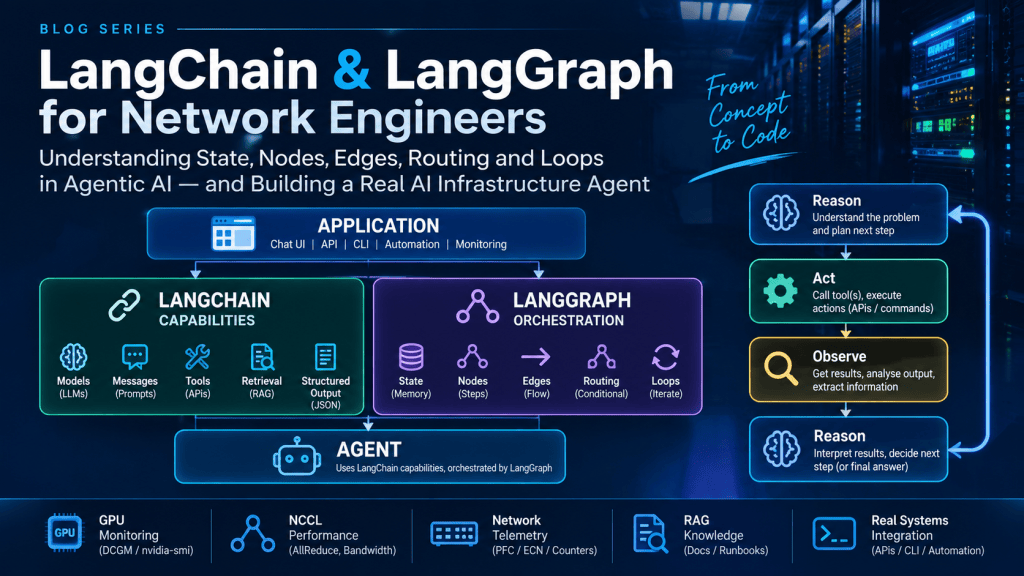
Part 1
Introduction
Over the last few months I have been spending a lot of my study time around AI infrastructure and Agentic AI.
For me there is an important distinction between learning how to use an AI framework and actually understanding what the framework is doing.
I can copy some Python code from a Claude or ChatGPT, install LangChain, run an agent and say I have built an Agentic AI application.
However have I really understood what is happening?
Probably not.
The purpose of this article is to go slightly deeper and understand the fundamental components behind LangChain and LangGraph Agentic framework.
As with most technologies I study, I like to first understand the theory and subsequently implement that theory in a lab environment.
This article will therefore be split into two main parts.
Part 1: Theory
Understanding LangChain, LangGraph and the fundamental components of an Agentic AI application.
Part 2: Implementation
We will actually build a small AI infrastructure troubleshooting agent using Python, LangChain, LangGraph, Qwen and Ollama.
The agent will be able to investigate GPU, NCCL and network telemetry and attempt to determine why an AI training workload is performing slowly.
The important aspect here isn’t really the AI infrastructure use case.
The purpose of the lab is to understand what is actually happening underneath the Agentic AI framework.
PART 1 – THEORY
What exactly is Agentic AI?
Before looking at LangChain or LangGraph I think we first need to understand what we are actually trying to build.
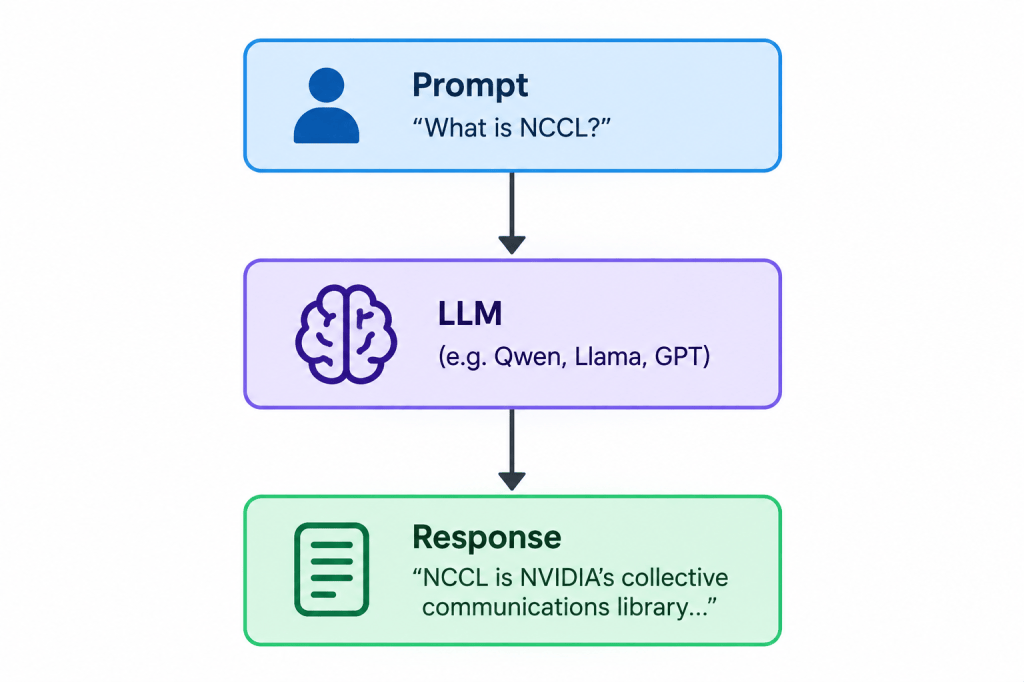
A normal interaction with a Large Language Model is relatively simple.
We provide a prompt.
The model processes that prompt.
The model generates a response.
There is nothing wrong with this.
However the model is fundamentally responding to the information it has available within its context.
What happens if I ask:Why is training slow on GPU node-1?
The LLM doesn’t magically have access to my GPU.
It cannot see DCGM.
It cannot see my NCCL performance.
It cannot see my Nexus switches.
It cannot see my PFC counters.
This is where things start becoming interesting.
Instead of simply asking the model to generate an answer, I want the model to be able to investigate the problem.
For example:
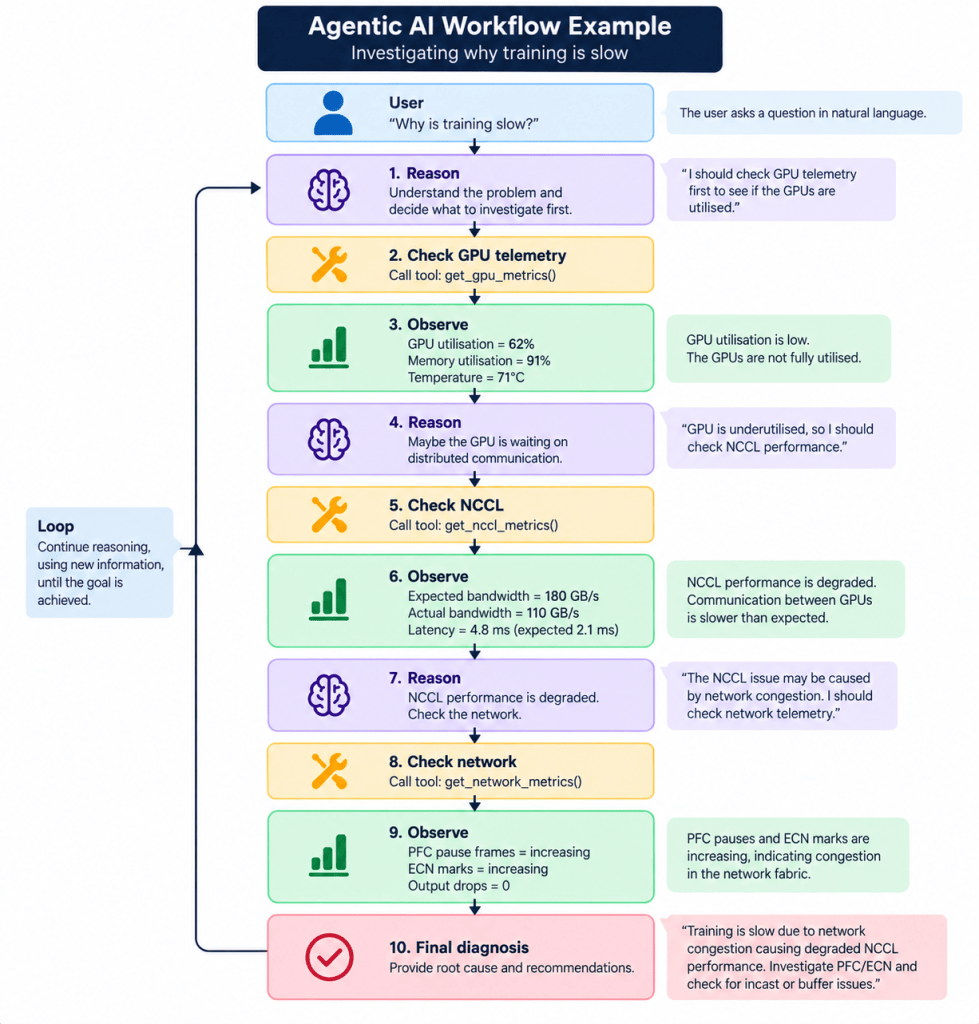
You can see what’s happening here….We have moved away from prompt > response
towards: Reason > Act > Observe > Reason > Act > Observe > Goal
This is one of the fundamental concepts behind an Agentic AI application.
The model is no longer simply answering the original question.
It has capabilities available to it and can potentially decide which capability to use based on what it has already observed.
LangChain and LangGraph
This is where LangChain and LangGraph come into the picture.
I initially found this slightly confusing because the two technologies are very closely related.
The simplest way I personally understand them is:
LangChain provides the capabilities available to the AI application. LangGraph provides the stateful orchestration controlling how those capabilities are used.
Another way to think of this is, LangChain = what can my AI application work with?
LangGraph = How does the workflow actually operate
They are inherently related but their responsibilities are different.
Understanding LangChain
For me LangChain becomes easier to understand when I divide it into five fundamental areas.
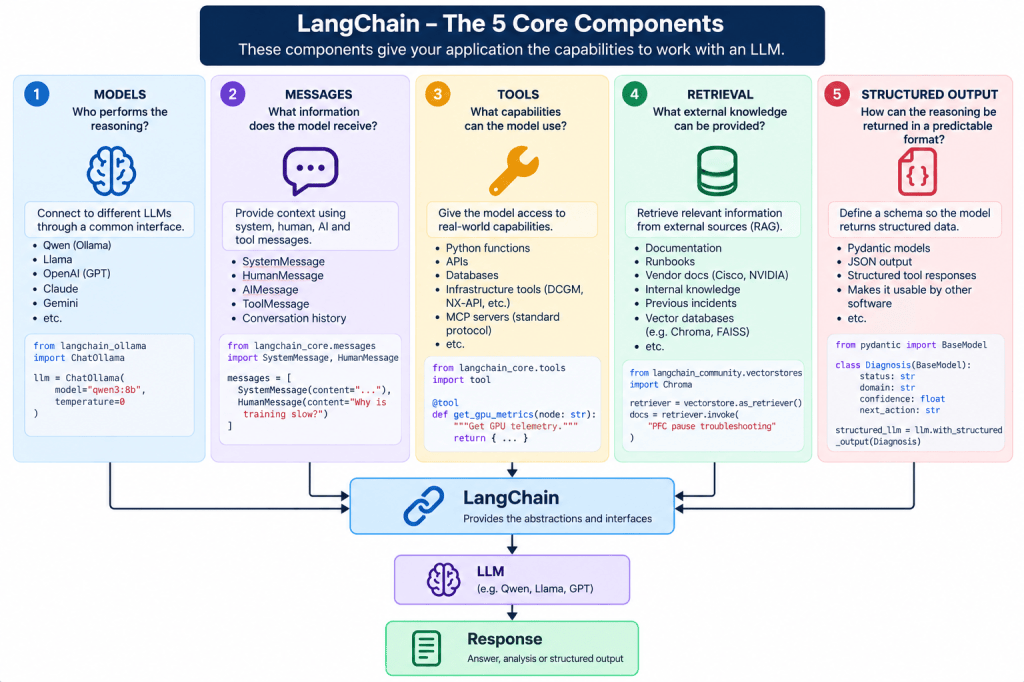
Let’s go through each one.
1. Models – Who performs the reasoning?
LangChain itself isn’t the Large Language Model.
This was one of the first important things for me to understand.
You can use any LLM cloud or local based. We’re using Qwen3.8b LLM in this particular example.
LangChain provides abstractions which allow our application to interact with models.
For example with Ollama:from langchain_ollama import ChatOllama llm = ChatOllama( model="qwen3:8b", temperature=0 )
The architecture therefore looks something like:
Ollama in this example is an inference that’s serving the model.
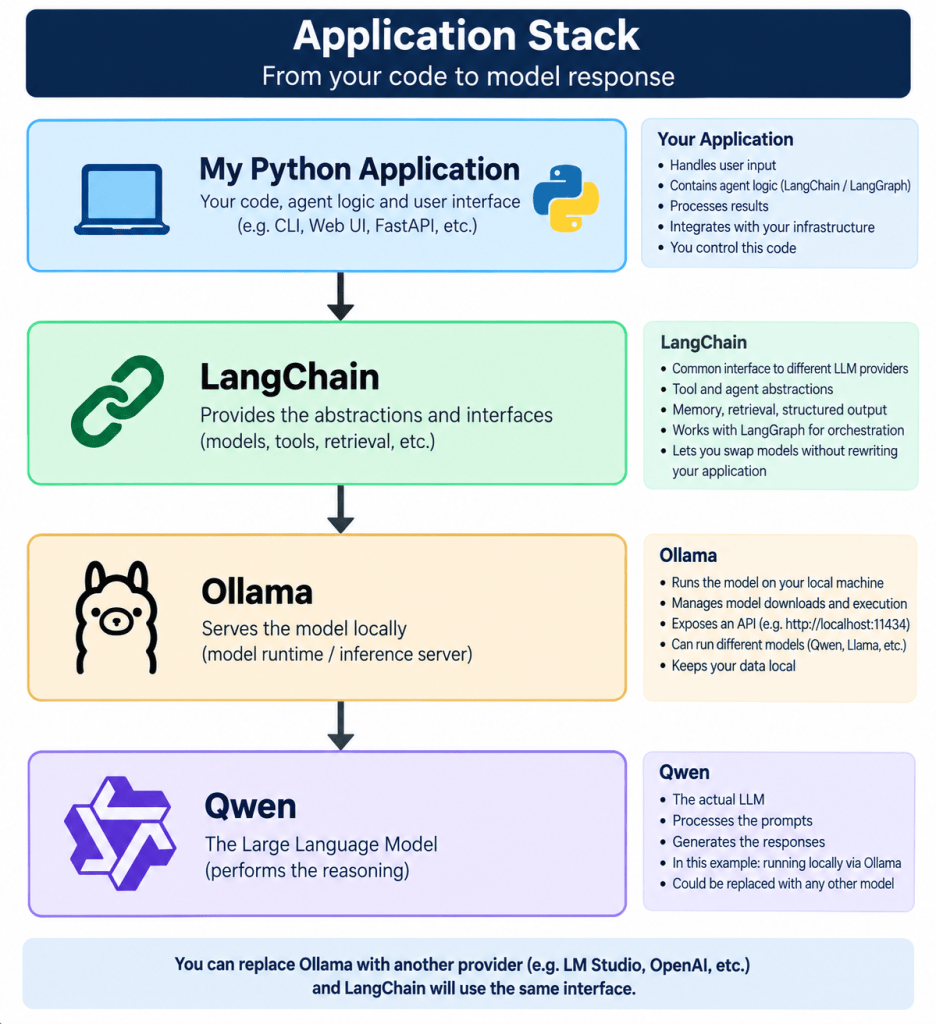
Qwen is performing the reasoning.
LangChain gives my application an interface for communicating with it.
This separation becomes important because I could later replace Ollama with LM Studio or vLLM or another inference server without completely redesigning my Agentic AI workflow.
2. Messages – What does the model see?
The model needs context.
For example:
from langchain_core.messages import ( SystemMessage, HumanMessage ) messages = [ SystemMessage( content=""" You are an AI infrastructure troubleshooting agent. Investigate GPU, NCCL and network performance. Base your conclusions on collected telemetry. """ ), HumanMessage( content="Why is training slow on node-1?" ) ]
We now have: A system message and humans question. A SystemMessage is essentially the instructions that define how the LLM should behave before it receives the user’s questions.
An important note is that during an Agentic workflow the message history can become much more interesting.
For example:
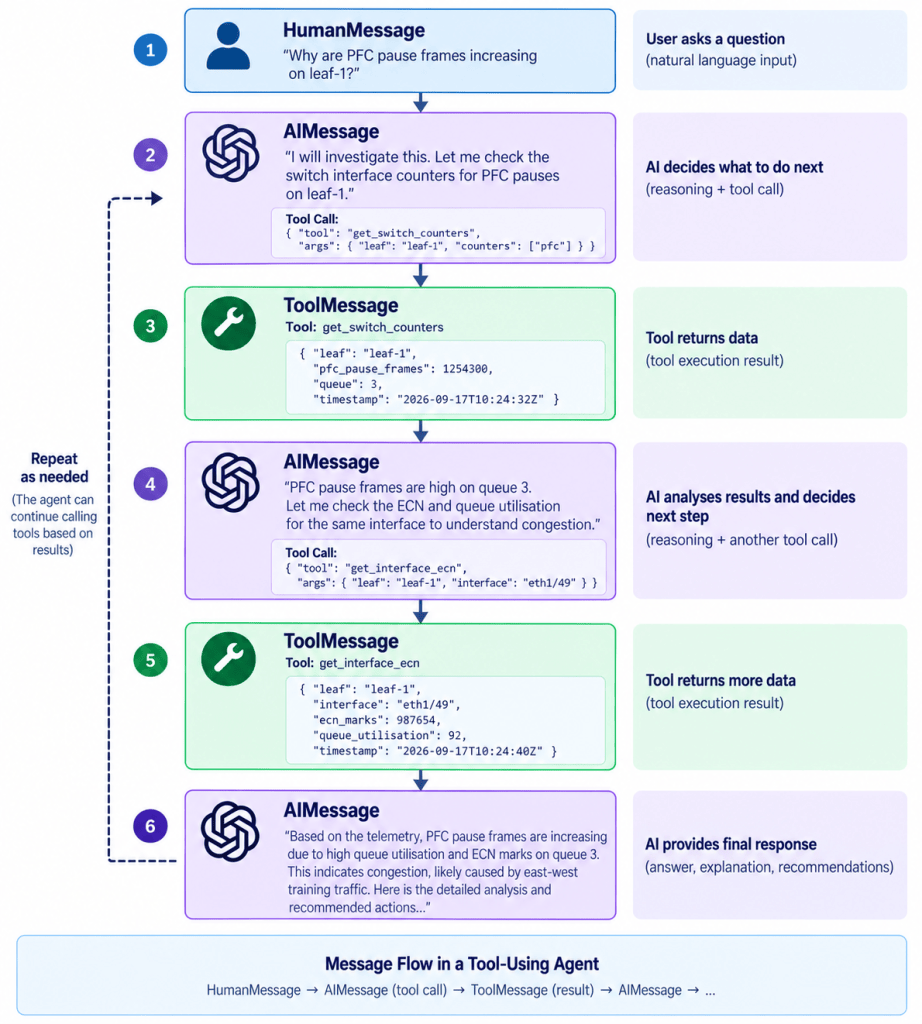
The agent may therefore know:
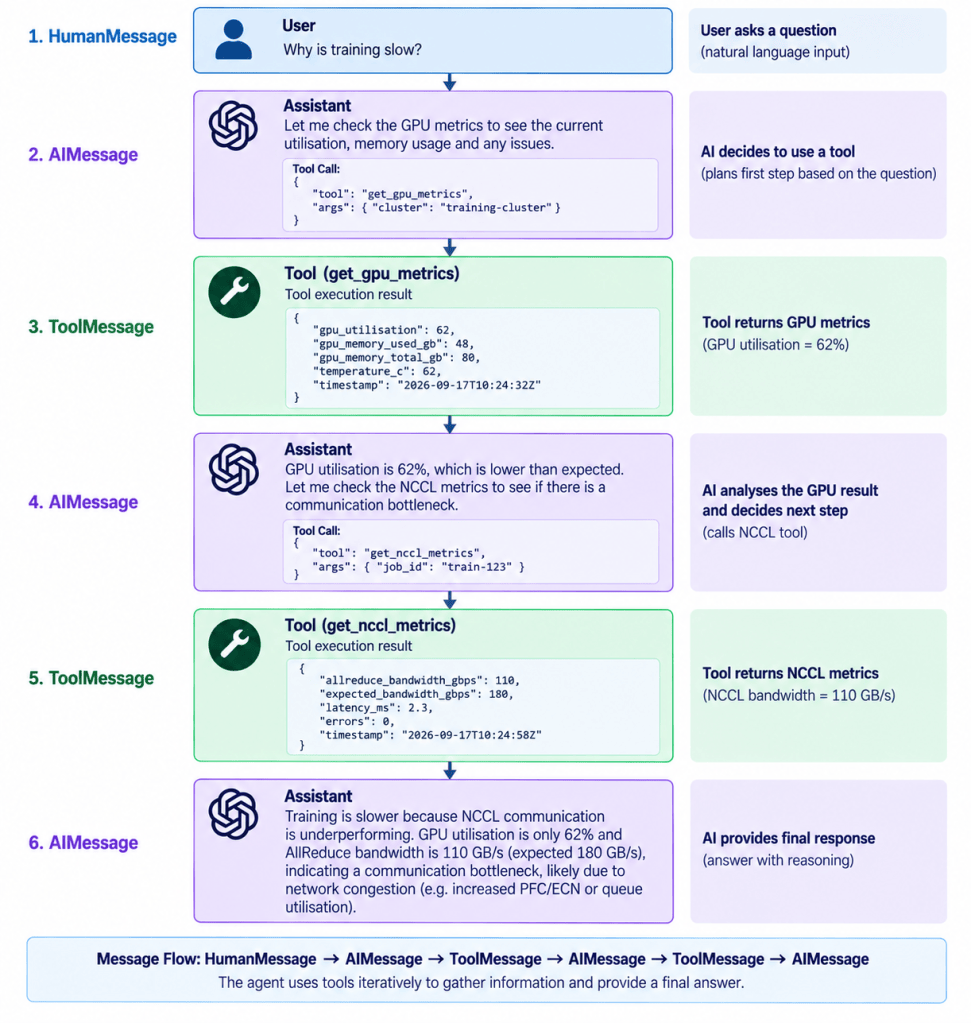
This evolving context becomes extremely important because the next decision can be based on what happened previously.
3. Tools – What can the Agent actually do?
This for me is one of the most important parts of Agentic AI.
The LLM by itself cannot inspect my infrastructure.
We need to give the application capabilities.
For example:
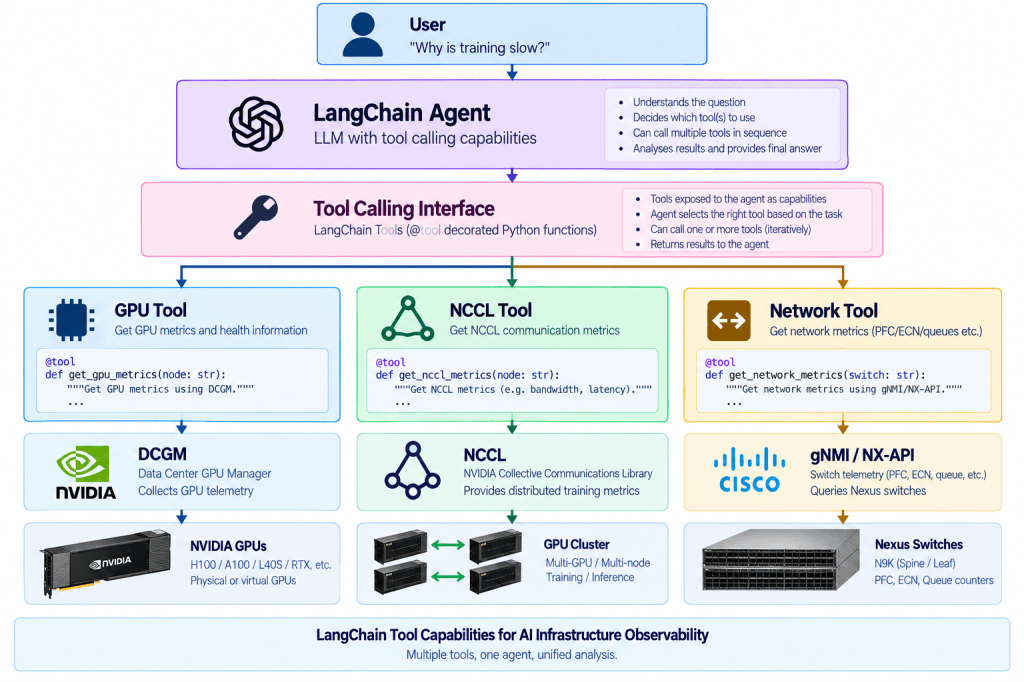
@tool turns your Python functions into capabilities the model can choose to invokeNow our application has capabilities.
Eventually these could communicate with real infrastructure:
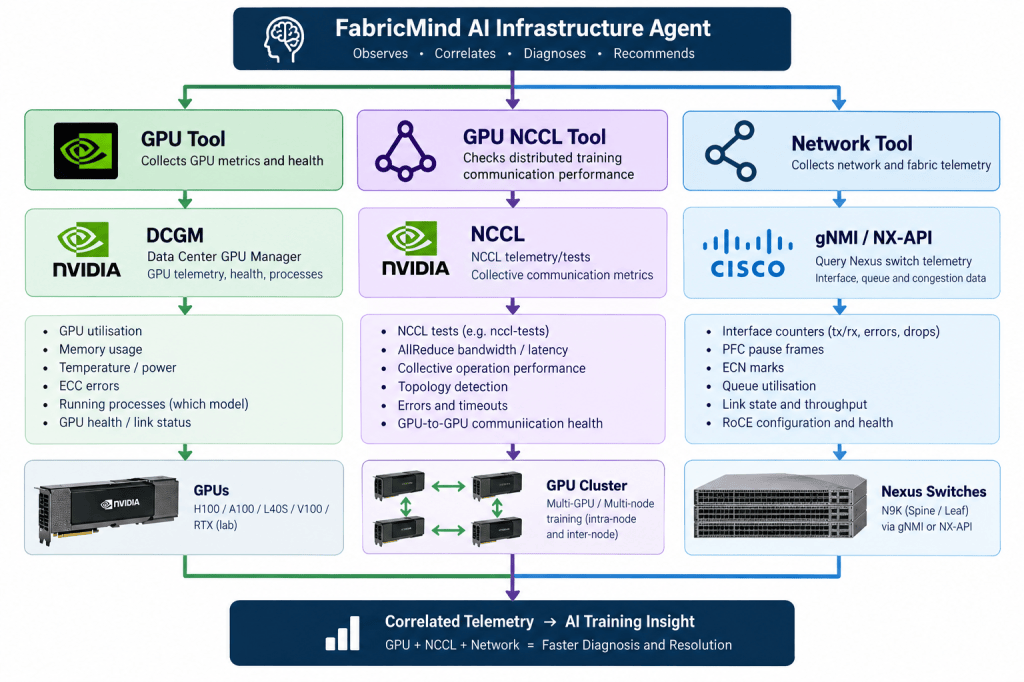
The key aspect to understand here is:
The LLM doesn’t magically have infrastructure access. We deliberately expose capabilities to the Agent.
What about MCP?
This is where MCP also fits.
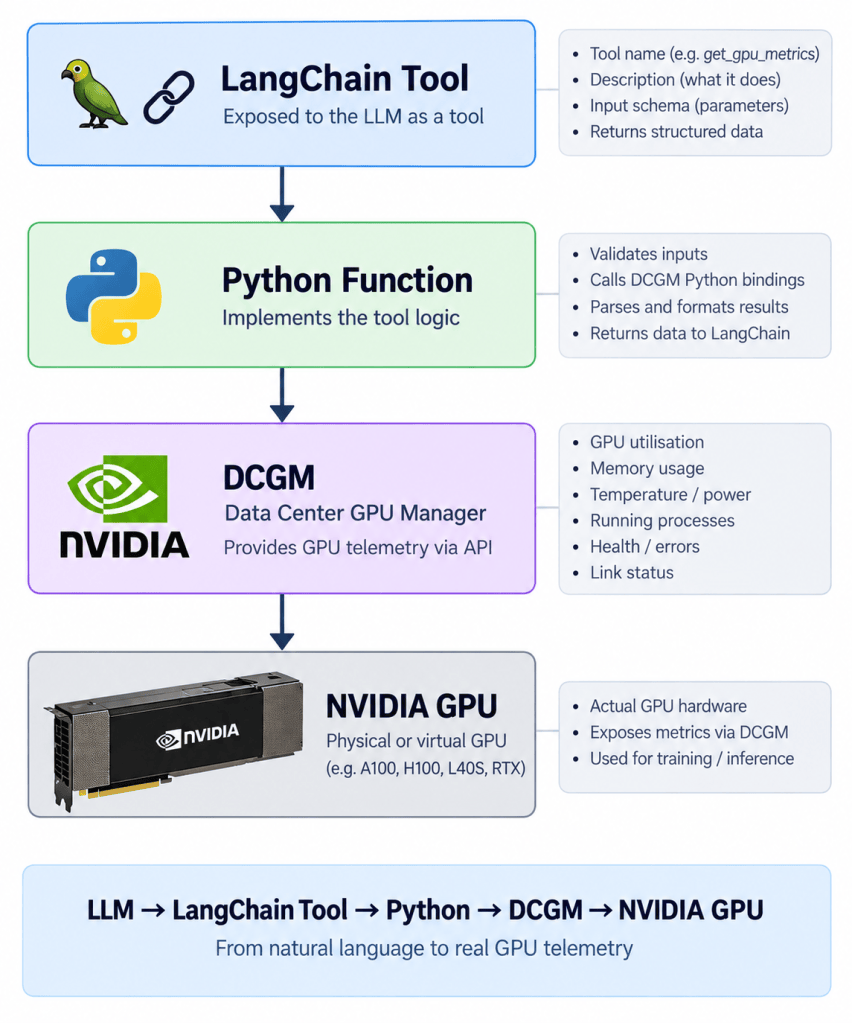
MCP and tools are not exactly the same thing.
A tool is the capability.
MCP can be the standard interface through which that capability is exposed.
Without MCP:
With MCP:
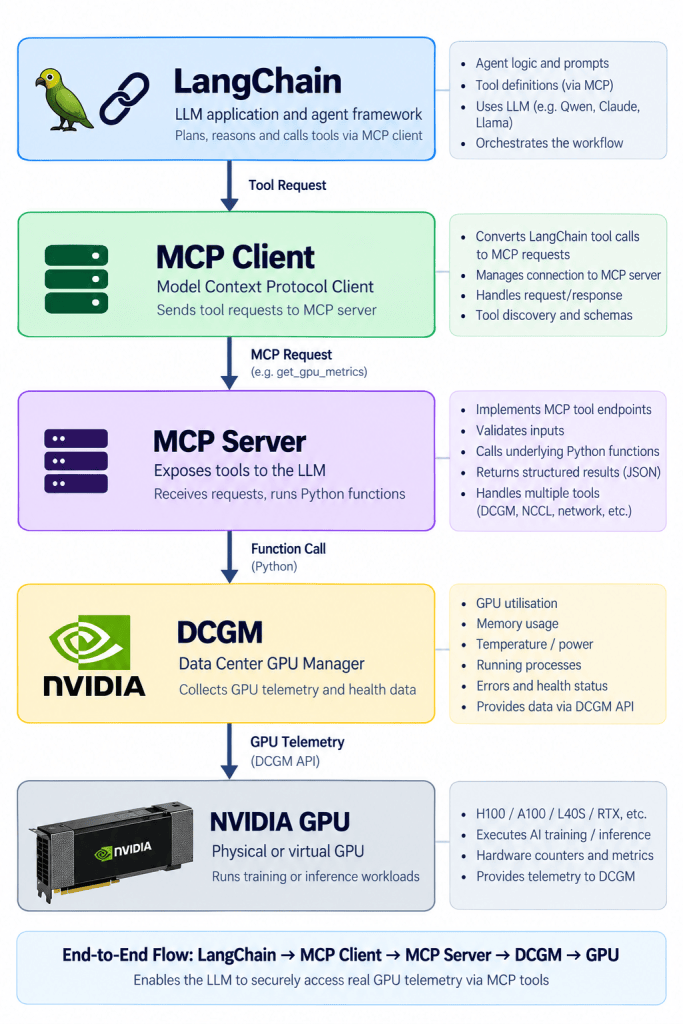
Therefore I personally think of this as: A tool is what capabilities exists? And MCP provides an interface to an external capability through a standard protocol.
For an AI infrastructure agent this could eventually become:
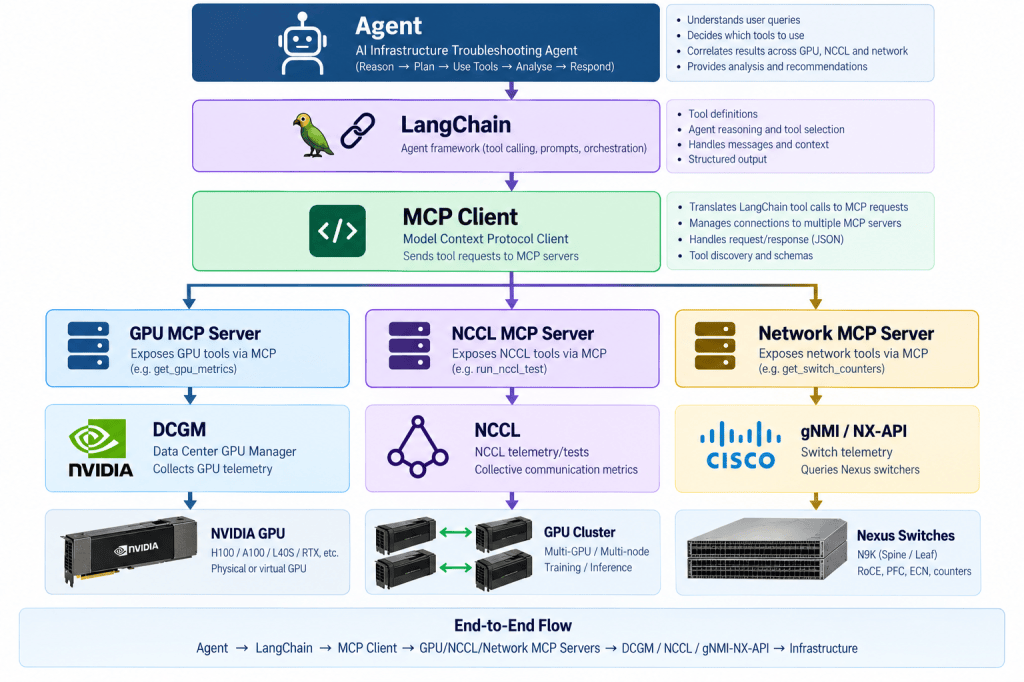
However I don’t want to introduce MCP into the first lab.
The purpose of the first lab is to understand the Agentic workflow itself.
Once this works, replacing our local Python tools with MCP-backed tools becomes another implementation detail.
4. Retrieval – What external knowledge can the Agent access?
Tools allow our Agent to interact with systems.
However sometimes we need knowledge rather than an action.
For example my infrastructure Agent may need access to:
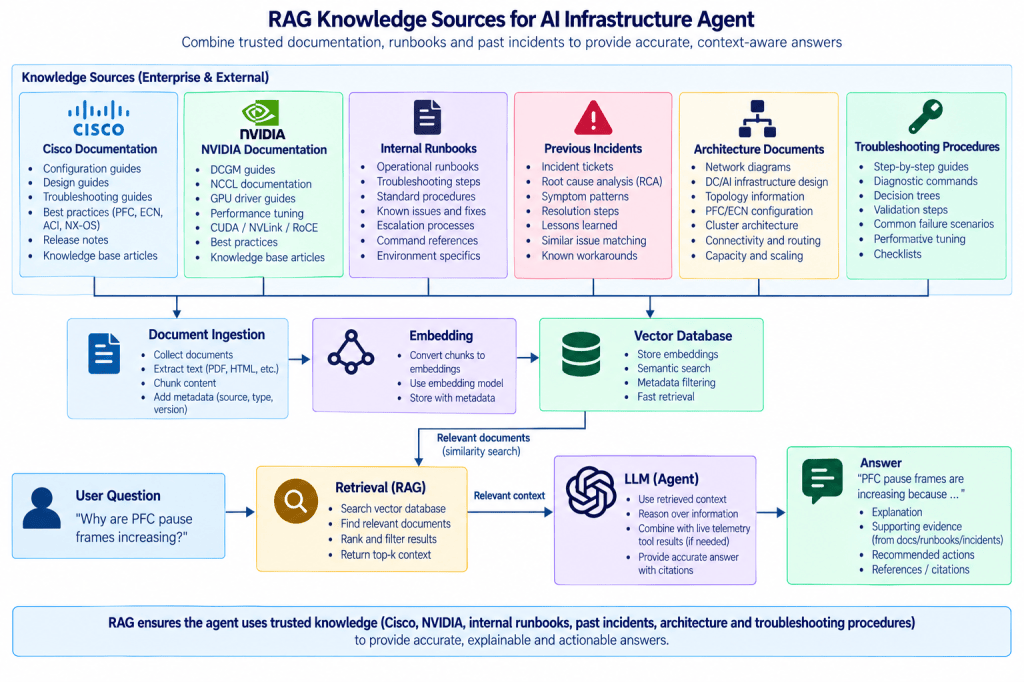
This is where retrieval and RAG become useful.
Instead of placing thousands of pages inside every prompt, we retrieve the relevant information.
For example:
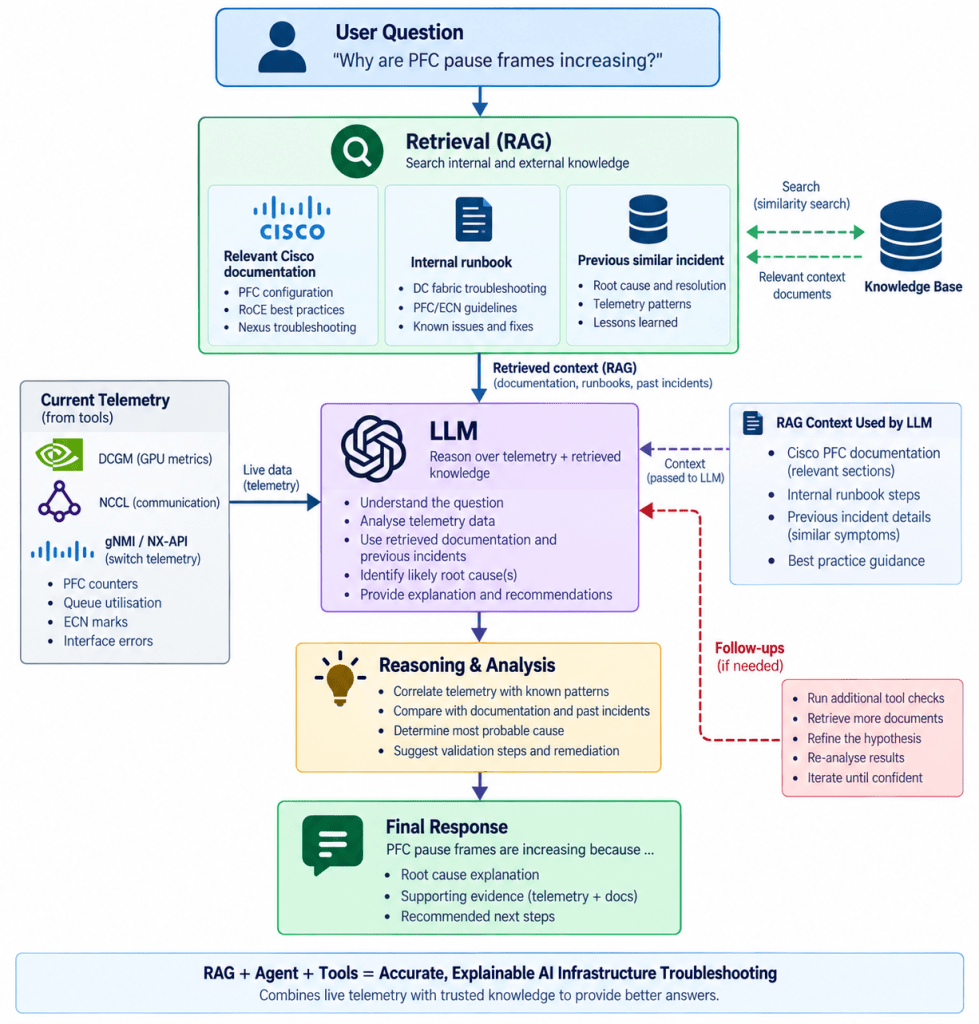
Now our Agent could potentially combine two different sources of information.
Live infrastructure telemetry:DCGM NCCL Nexus
and:
Knowledge:Documentation Runbooks Previous incidents
Conceptually:
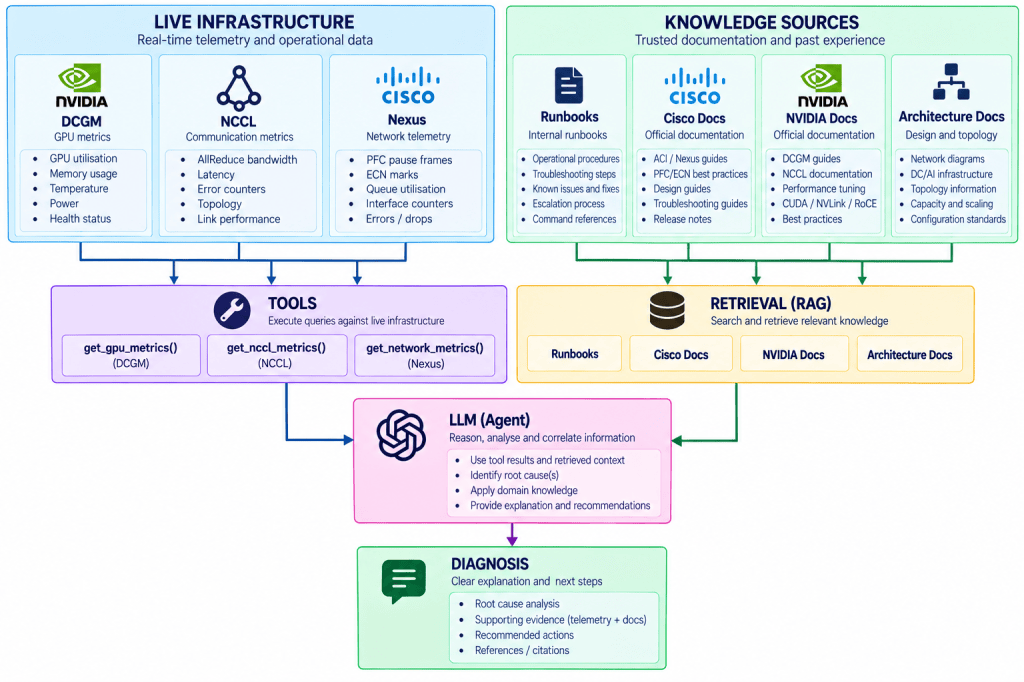
For me this is where AI infrastructure troubleshooting becomes extremely interesting.
5. Structured Output – Making AI useful to software
LLMs naturally produce text.
For example:The evidence suggests that degraded NCCL performance may be related to network congestion.
This is perfectly readable for a human.
However another software component may need something more predictable.
For example:{ "status": "degraded", "domain": "network", "confidence": 0.87, "next_action": "check_pfc" }
We can define the expected structure:from pydantic import BaseModel class Diagnosis(BaseModel): status: str domain: str confidence: float next_action: str
This becomes very powerful when combining AI reasoning with deterministic software.
For example:
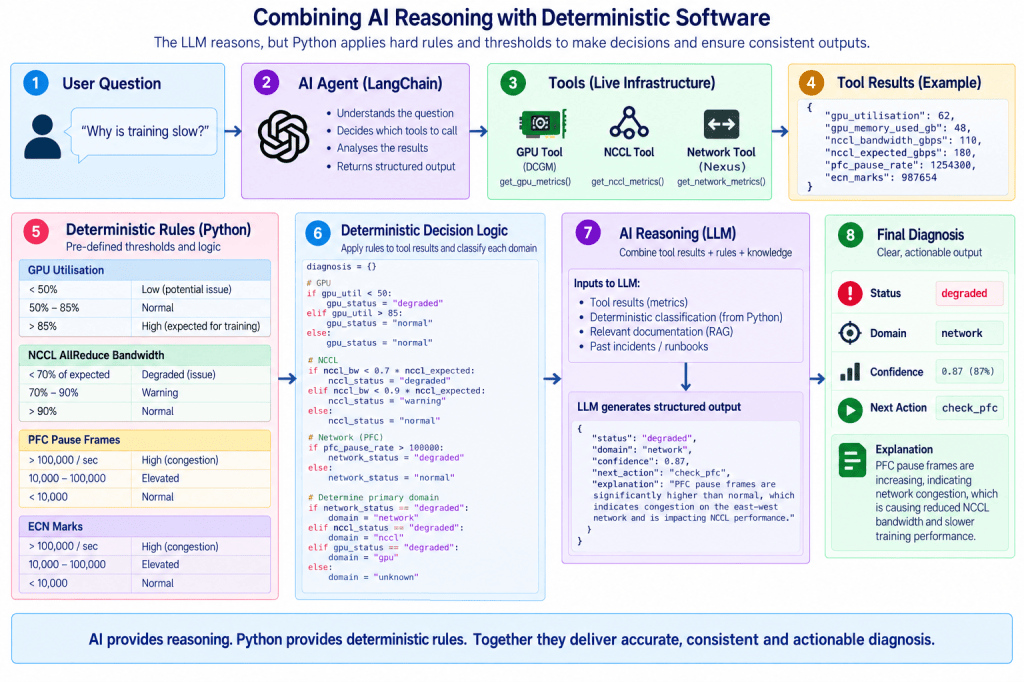
The LLM performs the reasoning.
The result is converted into something predictable.
Python subsequently handles the deterministic decision.
For me this is an important theme throughout Agentic AI:
Use AI where reasoning is required. Use deterministic software where the decision is already known.
Understanding LangGraph
Now we have capabilities.
We have a model.
We have messages.
We have tools.
Potentially we have retrieval.
But how does everything actually execute?
This is where LangGraph comes into the picture.
I personally divide LangGraph into five concepts:
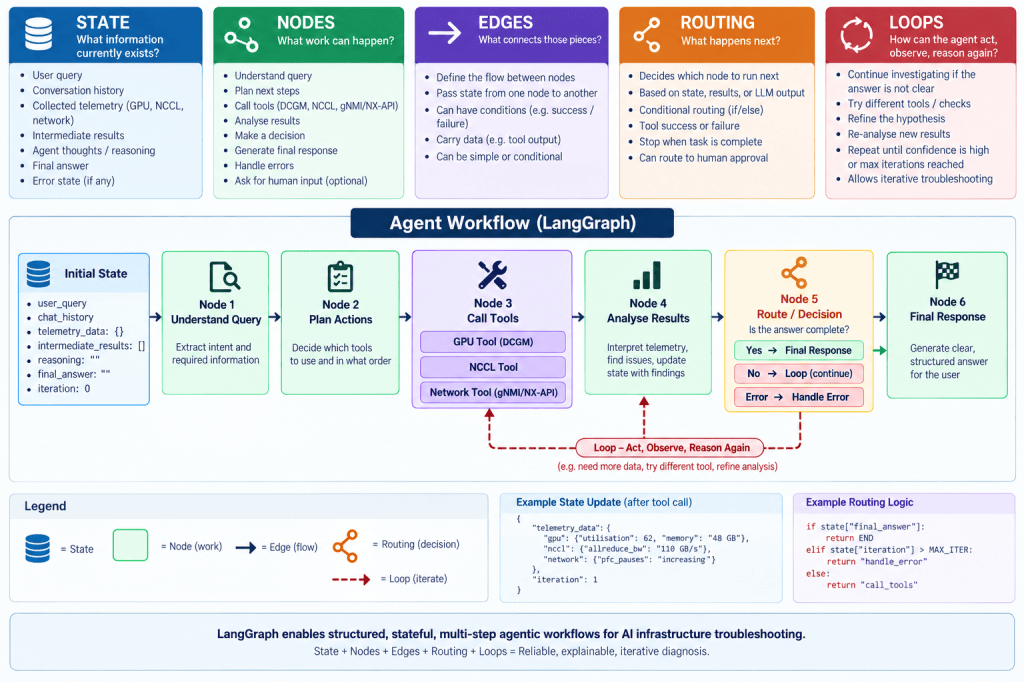
1. State – What does the Agent know?
For me the easiest way to understand State is to think of it as the case file for the current investigation.
Initially:Question: Why is training slow?
Then:Question: Why is training slow? GPU: Utilisation = 62%
Then:Question: Why is training slow? GPU: Utilisation = 62% NCCL: Expected = 180 GB/s Actual = 110 GB/s
Then:Network: PFC pauses increasing ECN marks increasing
Notice that the AI Agent has accumulated evidence.
This is State. State doesn’t perform the investigation. It remembers the investigation. This is completely different then memory.
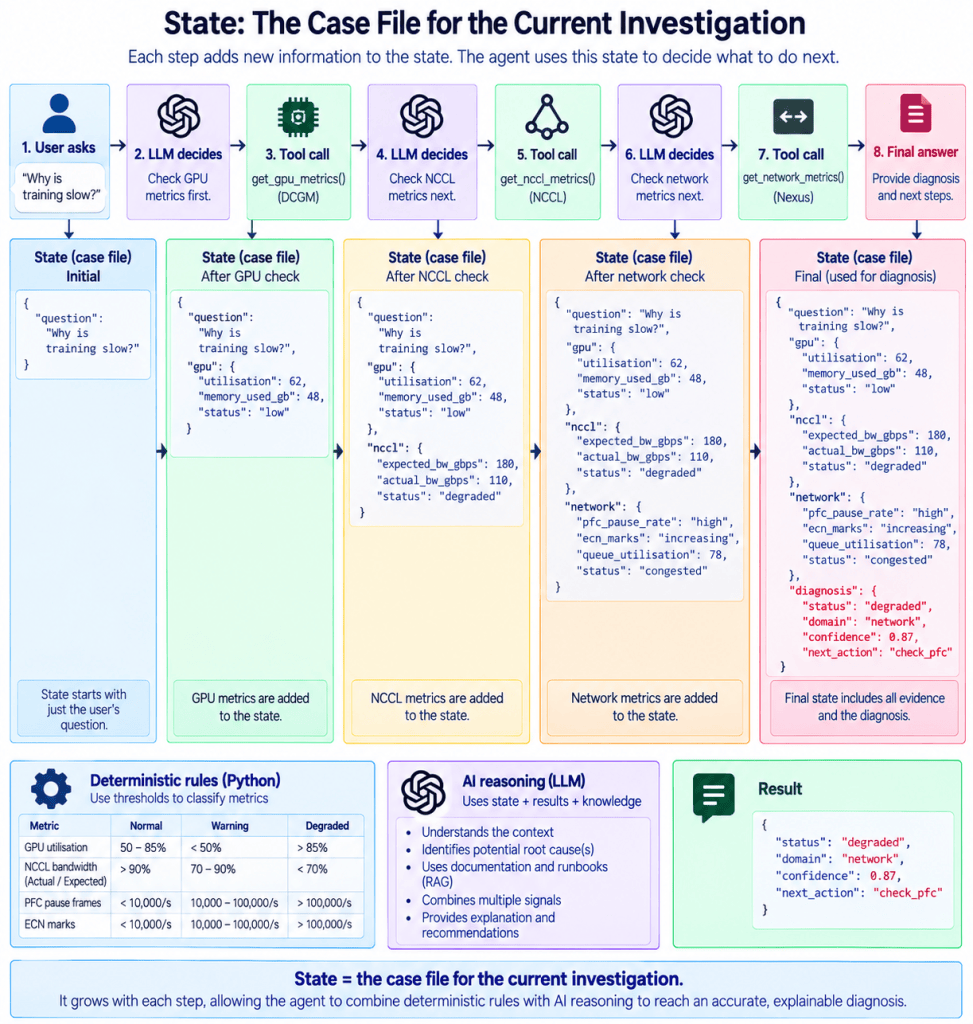
Each reasoning cycle has access to what happened previously state.
2. Nodes – What work can happen?
A Node performs work.
This could be run the LLM Execute a tool, validate data Query a database Ask for human approval Perform deterministic analysis and even ask the LLM to determine which is the best node to execute next.
So a key element to remember, in LangGraph, a node is a Python function/runnable that performs one step of the graph. That step could call DCGM directly, invoke a LangChain tool, call an LLM, perform deterministic Python logic, retrieve RAG context, etc
For example:def agent_node(state): ...
may call our LLM Qwen.
Whereas another Node could simply run normal Python.
It is important not to confuse a langchain tool with a Langraph node
NODE = a unit of workgpu_node()
TOOL = a capability that work can useget_gpu_metrics() → DCGM
Another example is not to call an actual tool but a create a node that allows the LLM to make the decision. Here’s an overview example of nodes in LangGraph:
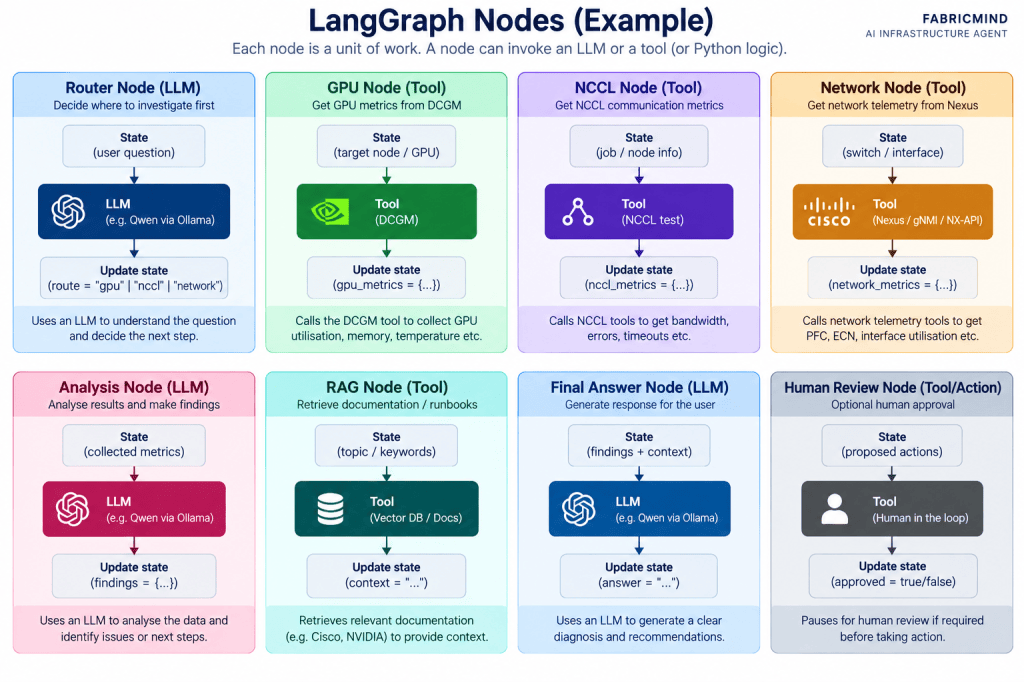
Think of nodes as a unit of execution. It might invoke an LLM, call a tool, run ordinary Python function, retrieve RAG context, or perform another operation.
LangGraph nodes allows us to combine application centric conditional logic, tool execution and AI Reasoning inside the same workflow.
3. Edges – What connects the work?
Edges are by far the most beautiful concepts of LangGraph.
Edges are arguably one of the most important aspects of the LangGraph framework simply because they define how execution moves through an agentic workflow. They connect nodes and determine whether the workflow follows a fixed deterministic path, a conditional path based on software logic, or a path influenced by LLM reasoning.
Nodes by themselves don’t create a workflow.
We need to connect them.
A EDGE determines which node executes next in a deterministic, conditional path or LLM reasoning.
For example Our GPU node, will execute our GPU tool that will retrieve the state of the GPU by executing a tool. This will be followed by another node such as NCCL. We are able to hard-code the workflow to start with GPU.
To help you understand the edges concept, let’s start from the top with the actual tools in langChain:
from langchain_core.tools import tool
@tool
def get_gpu_metrics(node: str):
“””Get GPU metrics from DCGM.”””
return {
“utilisation”: 62,
“memory_used_gb”: 48
}
@tool
def get_nccl_metrics(node: str):
“””Get NCCL communication metrics.”””
return {
“expected_gbps”: 180,
“actual_gbps”: 110
}
@tool
def get_network_metrics(switch: str):
“””Get network telemetry from Nexus.”””
return {
“pfc_pauses”: “increasing”,
“ecn_marks”: “increasing”
}
From the above, we created 3 tools in langChain that return dummy values, in production they would be inherently make an API call to each device to return real values.
Then we wrap nodes around those tools in LangGraph:
def gpu_node(state: State):
metrics = get_gpu_metrics.invoke({
“node”: “node-1”
})
return {
“gpu_metrics”: metrics
}
def nccl_node(state: State):
metrics = get_nccl_metrics.invoke({
“node”: “node-1”
})
return {
“nccl_metrics”: metrics
}
def network_node(state: State):
metrics = get_network_metrics.invoke({
“switch”: “leaf-1”
})
return {
“network_metrics”: metrics
}
Therefore structurally we have the following at this moment in time:
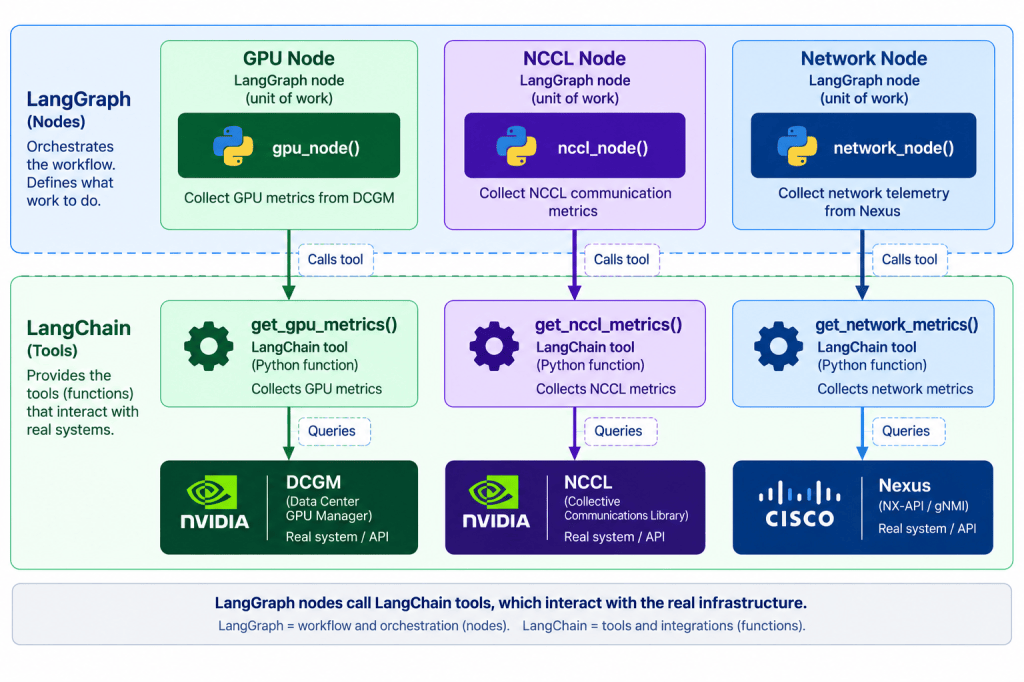
Now that we have defined the nodes in LangGraph, we will need to register them in the graph:
from langgraph.graph import StateGraph, START, END
graph = StateGraph(State)
graph.add_node(“gpu”, gpu_node)
graph.add_node(“nccl”, nccl_node)
graph.add_node(“network”, network_node)
In the next step this is where LangGraph edges come in:
graph.add_edge(START, “gpu”)
graph.add_edge(“gpu”, “nccl”)
graph.add_edge(“nccl”, “network”)
graph.add_edge(“network”, END)
app = graph.compile()
Notice what we performed here, we created a deterministic workflow orchestration. That means every investigation follows GPU > NCCL > Network.
The downside(or can be positive) of this deterministic approach is that it does not decide based on the user’s question. We have hard-coded the workflow to start with GPU regardless of the users question.
This literally means whenever this graph starts, run GPU node first.
But let’s say we want an agentic workflow where the LLM decides what’s the best node to execute based on user’s query?
If we want the LLM to select the best viable node next, we must add a LLM node in LangGraph:
from langchain_ollama import ChatOllama
llm = ChatOllama(model=”qwen3:8b”)
def router_node(state):
response = llm.invoke(f”””
You are an AI infrastructure troubleshooting agent.
Decide which area should be investigated FIRST.
Choose only:
gpu
nccl
network
Question:
{state[“question”]}
“””)
return {“route”: response.content.strip().lower()}
As we performed previously, we will need to register the LLM node in LangGraph:
from langgraph.graph import StateGraph, START, END
graph = StateGraph(State)
graph.add_node(“router”, router_node)
graph.add_node(“gpu”, gpu_node)
graph.add_node(“nccl”, nccl_node)
graph.add_node(“network”, network_node)
Notice from the above code block, we’ve now added: “graph.add_node(“router”, router_node)”
In the next step, we will add the LLM node edge as part of the LangGraph workflow and we will modify the edges so that they become a conditional edge.
# Always start with the LLM router
graph.add_edge(
START,
“router”
)
# LLM decision determines which node runs
graph.add_conditional_edges(
“router”,
choose_route,
{
“gpu”: “gpu”,
“nccl”: “nccl”,
“network”: “network”
}
)
# Finish after selected tool
graph.add_edge(“gpu”, END)
graph.add_edge(“nccl”, END)
graph.add_edge(“network”, END)
We’ve added the edge to the graph and at the start of the workflow. We will now always start with the LLM router node, subsequently the LLM will select the correct tool node based on its reasoning.
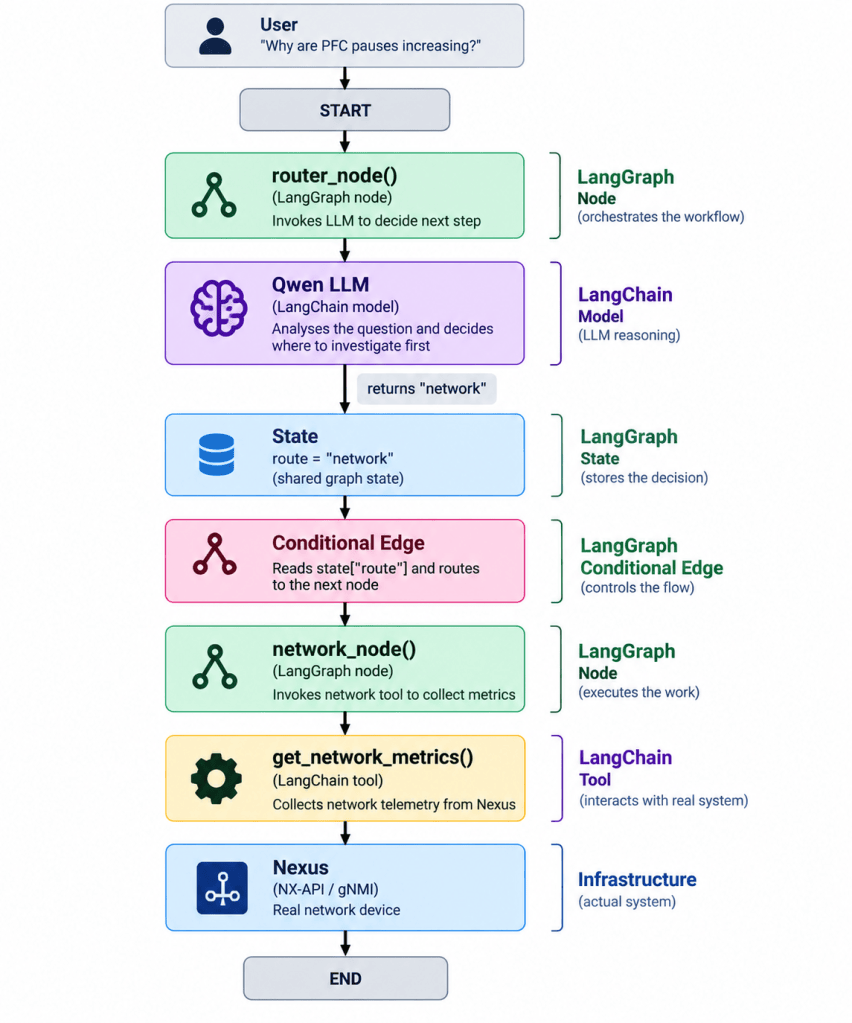
We’ve now turned our agent to use LLM reasoning to select the best course of action based on the user question.
What about the deterministic aspect of our agent? Surely there are aspects we should never let LLM decide?
The deterministic aspects will be based on the tool layer and should handle things that shouldn’t depend on an LLM’s interpretation. For example, what is the critical threshold for GPU utilisation? For example:
def get_gpu_metrics(node):
utilisation = dcgm.get_gpu_util(node)
if utilisation < 50:
status = “low”
elif utilisation < 85:
status = “below_expected”
else:
status = “healthy”
return {
“utilisation”: utilisation,
“status”: status
}
So now rather than asking the LLM to decide whether 42% satisfies a threshold we have explicitly defined it.
A small note, deterministic logic doesn’t have to exist only inside tools. LangGraph can also contain deterministic guardrails around the agent, for example, validating an LLM’s requested route, preventing an unsupported action, limiting investigation loops, or requiring human approval before a consequential action etc.
So we’re using deterministic software logic by using IF statements to establish facts then using probabilistic AI reasoning to decide what those facts mean for the investigation and what to node to call next to continue the investigation.
This is by far my favourite component of the LangChain/LangGraph agentic workflow.
The connection between Nodes is an Edge.
I think of this almost like a network topology.
Nodes are the devices.
Edges are the links.
Without the links we simply have isolated components.
The edge component determines which node executes next.
4. Routing – What happens next?
Routing is how LangGraph decides which node should execute next.
However do not confuse this complement with edges that was discussed in the above section.
A normal edge follows a fixed path:
graph.add_edge(“gpu”, “nccl”)
GPU Node → NCCL Node
However, an agent does not always need to follow the same path. We can use conditional routing to choose the next node based on the current State.
In the edges section above our example, the router_node() uses the LLM to interpret the user’s question:
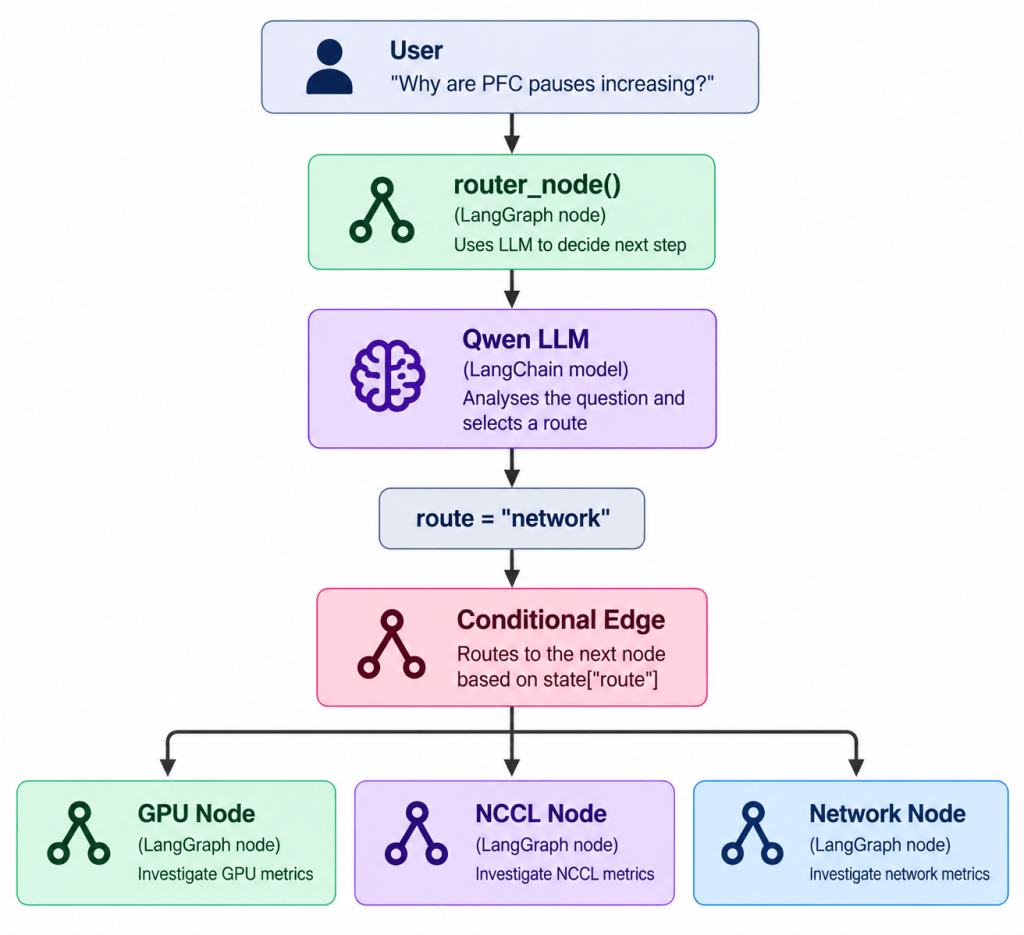
The LLM makes the reasoning decision, while LangGraph’s conditional edge performs the actual routing:
graph.add_conditional_edges(
“router”,
lambda state: state[“route”],
{
“gpu”: “gpu”,
“nccl”: “nccl”,
“network”: “network”
}
)
Note the simple distinction between router and edges:
Edge = connects the work.
Routing = decides which connection to follow.
This is where deterministic and Agentic AI can initially become confusing.
Suppose GPU utilisation is below 70%.
I could simply write:if gpu_util < 70: return "check_nccl"
If this is a known engineering rule then this is exactly what I should probably do.
There is little value in asking an LLM to calculate whether:62 < 70
Python can do this reliably every time.
However consider:Training became slower after yesterday's fabric maintenance. GPU utilisation is fluctuating. One worker periodically falls behind. AllReduce latency has increased. There are no obvious interface drops.
What simple if statement should I write?
This now requires interpretation.
The LLM may reason:The strongest evidence currently points towards distributed communication. Investigate NCCL first.
This is Agentic routing.
The important lesson for me is therefore not:Agentic = let the LLM decide everything.
Instead:
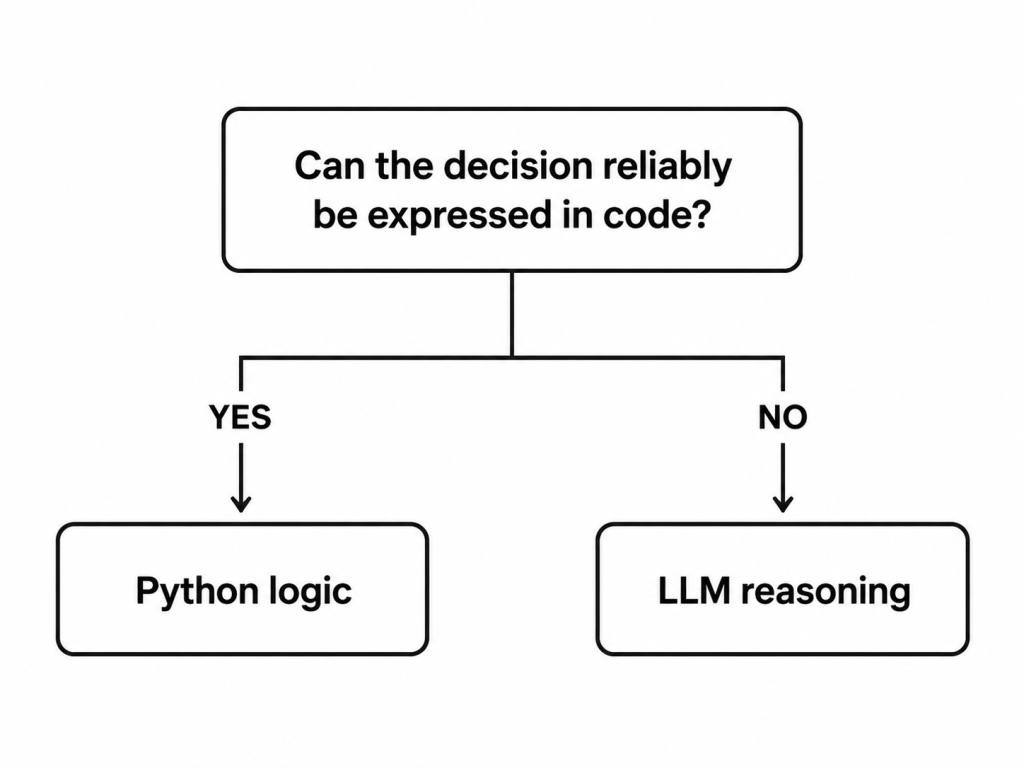
This is why I think good Agentic AI systems will generally be hybrid systems.
Use deterministic software for known rules.
Use the LLM where reasoning and interpretation adds value.
5. Loops – The fundamental Agentic workflow
For me this is probably the most important concept.
A normal LLM interaction is:
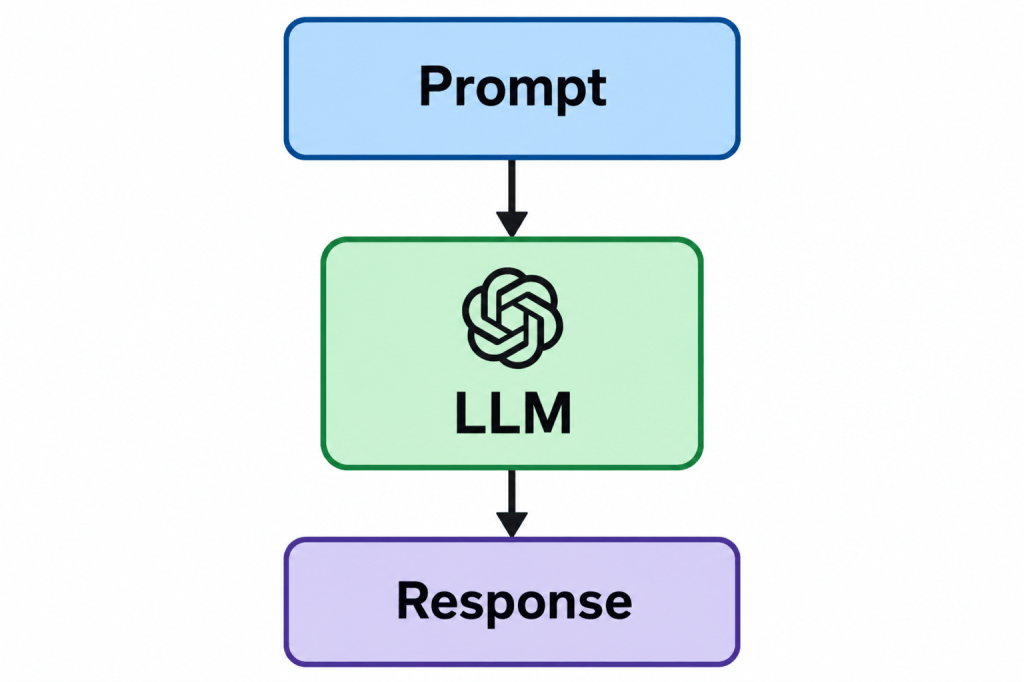
An Agent can operate in a loop:
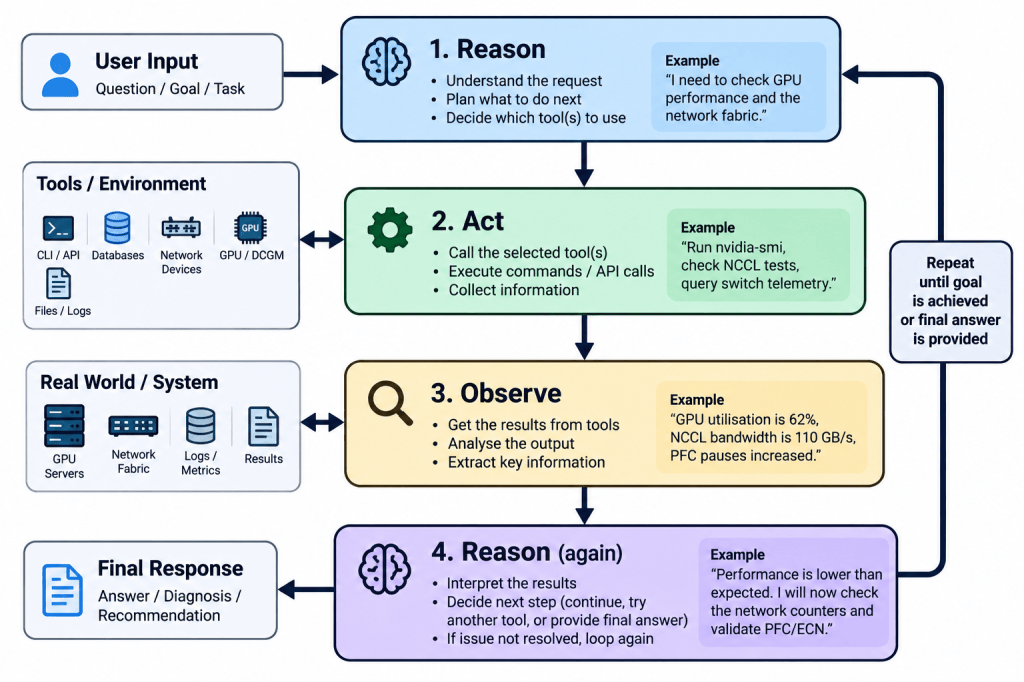
For example:
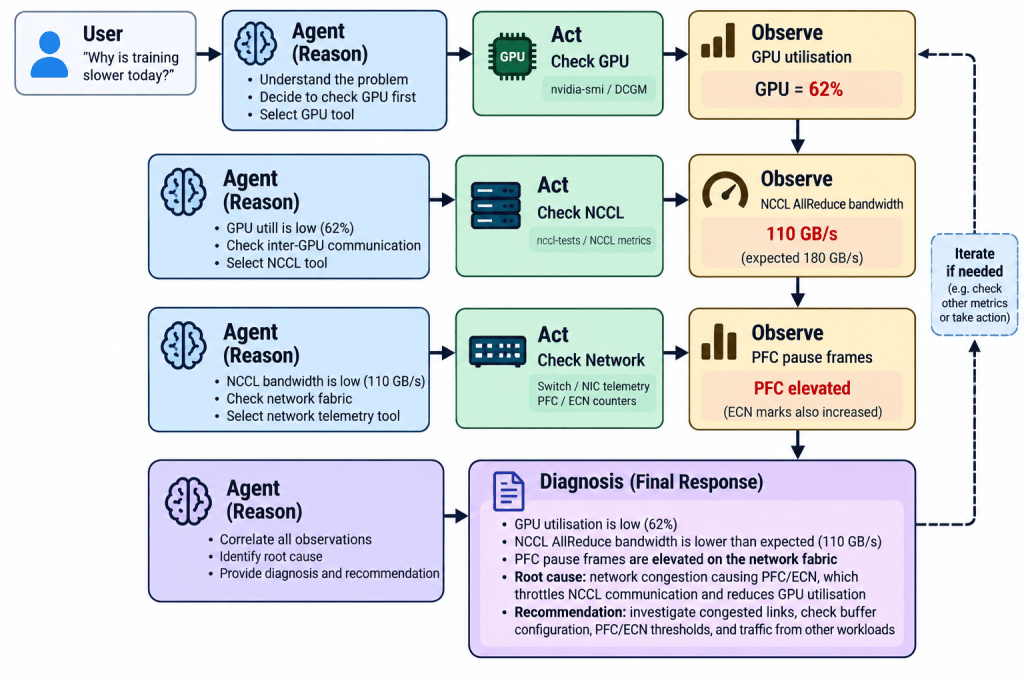
The Agent is able to use the result of one action to decide what it should do next.
That is an important difference.
The workflow isn’t necessarily:GPU → NCCL → Network
because I programmed that exact order.
Instead the model may decide that NCCL should be checked based on what it observed from the GPU tool.
LangGraph gives us the structure to implement this safely.
LangChain + LangGraph together
We can now put everything together.
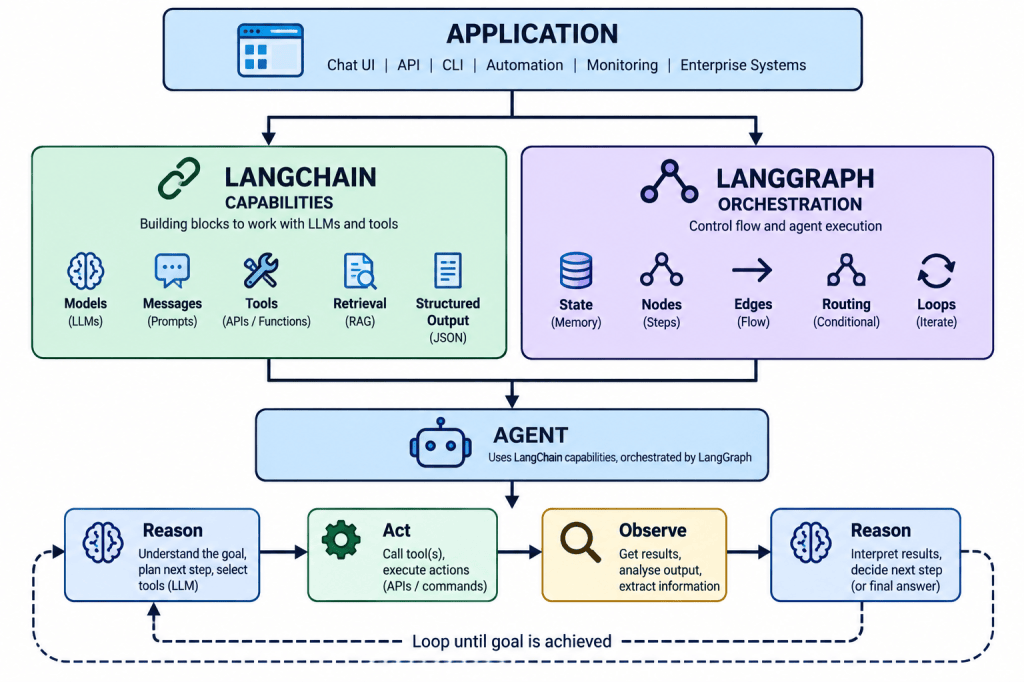
The simplest way I remember this is:
LangChain defines what the Agent can work with. LangGraph defines the Agent workflow.
In PART 2 we will actually build our agent.


Leave a Reply