Separating an Agent’s General Instructions from Its Specialised Operational Knowledge
Introduction
Over the last few months I have been spending a fair amount of time studying AI infrastructure and Agentic AI. One thing I have learned over the years is that using a technology and understanding how it actually works are two different things.
I can install a Python framework, copy some code, provide a prompt to an LLM and get an agent to call a tool. That’s a good starting point. However, I also want to understand why we are using that particular component and what problem it is trying to solve.
As I mentioned in an earlier article about studying and retaining knowledge, I generally like to understand the theory, implement it and then explain what I have learned. This article follows a similar approach.
While looking into Claude Code and the Claude Agent SDK, I came across Skills. At first glance a Skill looked rather similar to the instructions we might already provide to an agent through a system prompt.
But is it actually the same thing?
Not quite.
I think the interesting part is the separation between the agent’s general instructions and its specialised operational knowledge. This becomes particularly useful when an agent needs to perform several different tasks, each with its own troubleshooting procedure.
I will use a GPU performance investigation as an example, and compare how we might approach it using Claude Code, LangChain and LangGraph. You do not need previous experience with any of these frameworks to follow the example.
What are we actually comparing?
Before going into Skills, we need to understand the technologies involved.
Claude Code is Anthropic’s agentic coding environment. You can use it from a terminal to work with files, run commands and interact with available tools. It does more than simply send a question to a language model and display a reply.
Claude Agent SDK allows developers to use the same type of agent environment programmatically in Python or TypeScript. Instead of manually interacting through the Claude Code terminal, we can integrate those capabilities into an application.
LangChain is a widely used open-source framework for building applications powered by Large Language Models (LLMs). It gives developers a way to connect a model to prompts, tools and other application components. Its agent abstraction can manage a reasoning and tool-calling loop.
LangGraph is the orchestration framework in the LangChain ecosystem. It is particularly useful when we want to define the order of execution, share state between nodes and control how an agent moves from one stage to another.
There is an important distinction here: Claude Code is an agent environment, LangChain is an application framework, and LangGraph is an orchestration framework. They are not all the same type of product. We are comparing how they handle a particular requirement, rather than declaring one a direct replacement for another.
First, what is a system prompt?
Let’s assume I am building an AI Infrastructure Assurance application called FabricMind.
Its purpose is to investigate performance issues across GPUs, NCCL communication and the underlying network.
Like any other agent, it needs general instructions. For example:
System prompt Example:
system_prompt = “””
You are FabricMind, an AI Infrastructure Assurance agent.
Your role is to investigate GPU, NCCL and network
performance issues.
Use collected telemetry to support your findings.
Do not invent missing evidence.
Do not make changes to infrastructure without approval.
“””
This tells the agent what it is responsible for and how it should behave.
However, it does not explain every technical step required to investigate a GPU incident. Nor does it contain the full troubleshooting procedures for NCCL or the network.
We could put all these procedures into one very large system prompt. But what happens as we add more infrastructure domains and hundreds of diagnostic instructions?
We end up supplying a lot of information that may not be relevant to the particular question. We also make the instructions more difficult to maintain.
This is the problem that reusable Skills help address.
What exactly is a Claude Code Skill?
The simplest way I personally understand a Skill is as a reusable operational playbook.
For example, when a GPU training workload is slow, an infrastructure engineer would not randomly jump between commands. There is normally a logical troubleshooting process.
We might start with GPU utilisation and memory. Then look for errors or throttling. If the problem appears to involve communication between GPUs, we might investigate NCCL and subsequently the network.
Rather than explaining that sequence every time, we can document it once as a Skill.
In Claude Code, a Skill is normally defined in a file called SKILL.md. The file contains a name, a description and the instructions that the agent should follow when the Skill is used. It can also reference other files and scripts.
For FabricMind, our directory might look like this:
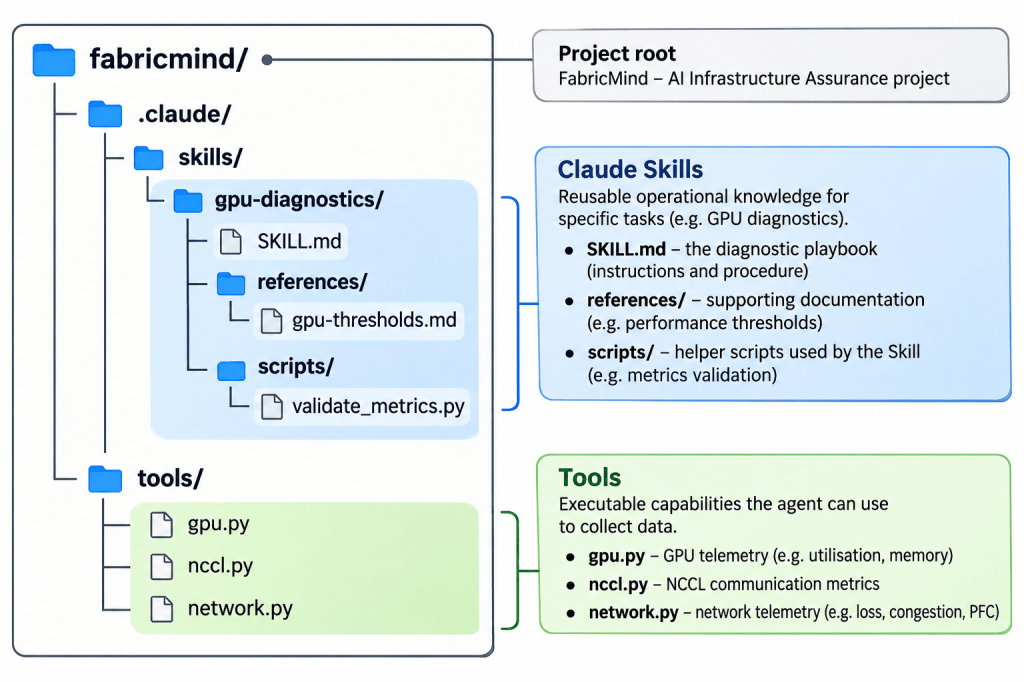
Our SKILL.md might contain the following:
.claude/skills/gpu-diagnostics/SKILL.md
—
name: gpu-diagnostics
description: Diagnose GPU performance, NCCL communication
and related network issues in FabricMind.
—
# GPU Diagnostic Playbook
When investigating GPU performance:
1. Collect GPU utilisation, memory and temperature metrics.
2. Check for GPU errors or throttling.
3. Collect NCCL communication metrics.
4. If NCCL errors or latency are abnormal,
investigate network loss, congestion and PFC counters.
5. Correlate the findings.
6. Produce a report with symptoms, evidence,
possible causes and recommended next steps.
Use approved read-only diagnostic tools.
If telemetry is missing, say so explicitly.
Notice what we have done.
The system prompt establishes who the agent is. The Skill provides the specific troubleshooting procedure. Think of it as a system prompt specifically for a tool.
But the Skill is not the tool that reads the GPU. That is another important distinction.
A Python function, command or MCP-exposed tool can retrieve the telemetry. The Skill explains when and why that capability should be used.
For me, this is similar to the difference between giving an engineer access to a switch CLI and giving that engineer a structured troubleshooting procedure. Access to commands does not automatically mean we know which commands to run or how to interpret the output.
How does Claude know when to load a Skill?
This was the part I found particularly interesting.
Claude Code does not need to load the complete contents of every Skill at the start of every conversation.
Instead, it can initially see the name and description of the available Skills. When a particular Skill is relevant or explicitly invoked, its detailed instructions are loaded into the agent’s context. Supporting files can be read as needed.
This approach is commonly referred to as progressive disclosure.
To invoke our example manually from Claude Code, the request could be as simple as:
CODE BLOCK 3 — Claude Code terminal/gpu-diagnostics Diagnose GPU performance on node-1
Claude can also select a relevant Skill based on the user’s request, assuming the Skill is available and its description is suitable.
One technical point is worth making clear. A Skill is a separate resource and feature, but it is not a new privileged message role in the underlying LLM API. The metadata and subsequently loaded instructions become part of the context available to the agent. A system prompt and a Skill therefore remain conceptually different, even though both ultimately influence model behaviour.
What about the Claude Agent SDK?
So far we have been talking about using Claude Code interactively.
What if I wanted this capability inside my own Python application?
This is where the Claude Agent SDK becomes useful. It allows us to run an agent session in Python and make selected filesystem Skills available to it.
For example:
Claude Agent SDK Example
import asyncio
from claude_agent_sdk import query, ClaudeAgentOptions
async def main():
options = ClaudeAgentOptions(
setting_sources=[“project”],
skills=[“gpu-diagnostics”],
allowed_tools=[“Read”, “Bash”],
)
async for message in query(
prompt=”Diagnose GPU performance on node-1″,
options=options,
):
print(message)
asyncio.run(main())
The example assumes the SDK has been installed and configured, the project Skill exists, and diagnostic commands are available. It is intended to show the structure rather than represent a production-ready deployment. I would also restrict executable commands and their permissions before connecting this to real infrastructure.
In this approach the Skill can guide the agent’s diagnostic steps, while the SDK provides the agent environment and tool execution capability.
However, an instruction in SKILL.md is still an instruction. It does not by itself guarantee that each stage will be executed in exactly the order written.
This brings us to the LangChain comparison.
How would I approach the same task using LangChain?
With a conventional LangChain agent, we can define general instructions and expose a set of tools to the model.
For this example I will use simulated telemetry. We are not actually communicating with a GPU or a network switch.
Basic LangChain agent
from langchain.agents import create_agent
from langchain.tools import tool
@tool
def read_gpu(host: str) -> dict:
“””Retrieve GPU telemetry for a host.”””
return {“host”: host, “gpu_util”: 45, “temperature_c”: 78}
@tool
def read_nccl(host: str) -> dict:
“””Retrieve NCCL communication telemetry.”””
return {“host”: host, “errors”: 2, “latency_ms”: 18}
agent = create_agent(
model=”ollama:qwen3:4b”,
tools=[read_gpu, read_nccl],
system_prompt=”””
You are FabricMind, an AI infrastructure agent.
Diagnose GPU performance using available evidence.
Investigate NCCL if communication issues are suspected.
Never invent telemetry.
“””,
)
result = agent.invoke({
“messages”: [{
“role”: “user”,
“content”: “Diagnose slow training on node-1”,
}]
})
print(result[“messages”][-1].content)
The @tool decorator makes the Python functions available as tools. The LLM can decide which one to call and interpret the returned information.
The model shown here is Qwen served through Ollama, which fits the local inference approach I have been experimenting with. The model must support the tool calling required by the agent.
Our diagnostic procedure is largely inside the system prompt. This works for a small example. But for a larger platform I would prefer to separate the common agent instructions from the detailed procedures.
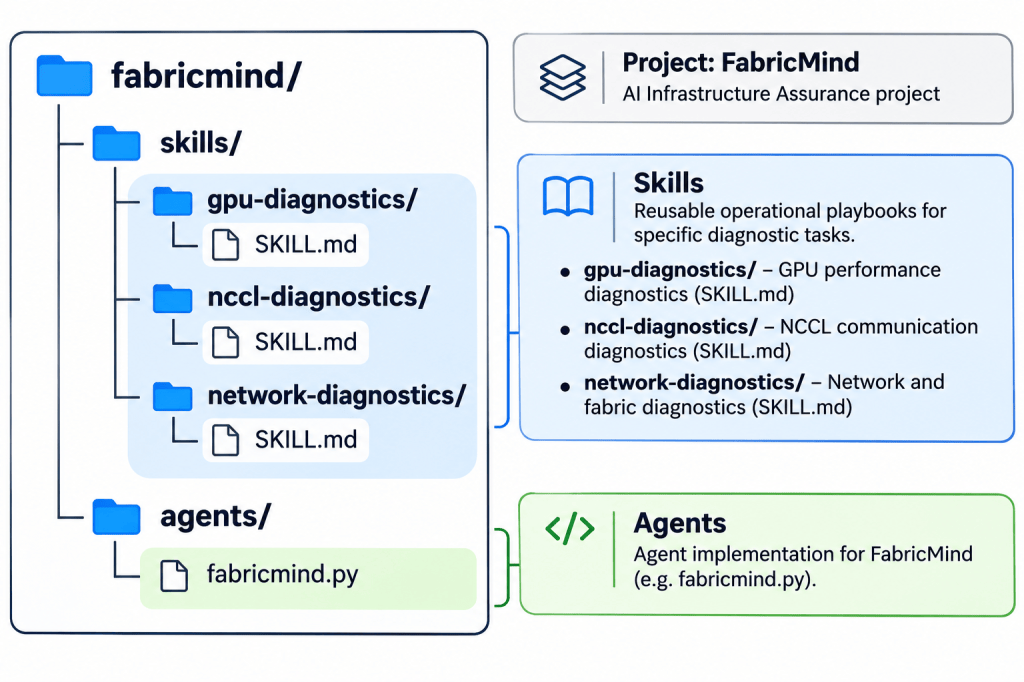
Interestingly, LangChain’s Deep Agents supports Skills as well. It can use the same general SKILL.md approach, with a separate directory of reusable instructions that are loaded when relevant.
Therefore, I don’t think it is correct to say that Claude has Skills and LangChain does not. The closer comparison is Claude Code Skills and Deep Agents Skills. A basic create_agent implementation, like the example above, does not automatically provide that same filesystem Skill-loading experience.
For example, the Deep Agents project could use this structure:
The general principle is the same: make operational knowledge reusable rather than duplicating it in every prompt.
Where does LangGraph fit into all of this?
This is where I think the architecture becomes more interesting, especially when we are dealing with infrastructure operations.
Let’s return to the GPU performance issue.
I want FabricMind to collect GPU metrics first. Subsequently, I want it to examine NCCL performance. If NCCL errors or latency exceed a defined threshold, I want the network diagnostic stage to execute.
I do not necessarily want to leave that sequence entirely to the LLM.
With LangGraph, I can define each stage as a node, store the collected results in shared state and use conditional routing to decide which node should run next.
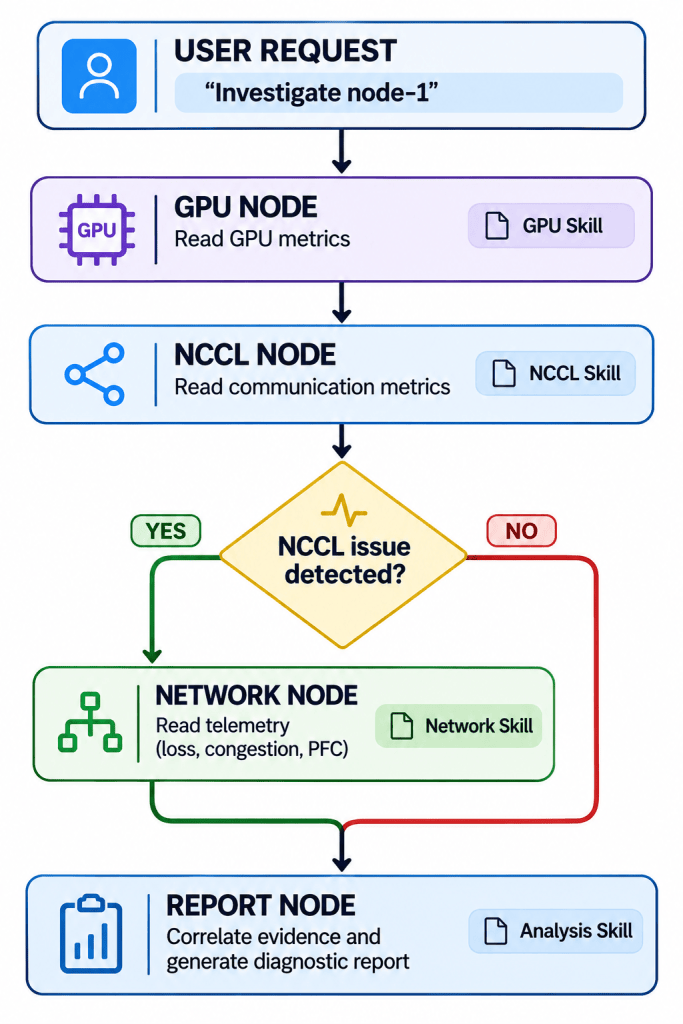
The corresponding routing logic can be very simple:
LangGraph routing example
def route_diagnostics(state):
nccl = state[“nccl”]
if nccl[“errors”] > 0 or nccl[“latency_ms”] > 10:
return “network”
return “report”
# In the StateGraph definition:
graph.add_edge(“gpu”, “nccl”)
graph.add_conditional_edges(
“nccl”,
route_diagnostics,
{“network”: “network”, “report”: “report”},
)
graph.add_edge(“network”, “report”)
This is only the routing section; it assumes we have defined the graph, its nodes and a state schema. The threshold is illustrative and should not be treated as a universal NCCL performance limit.
The important thing to understand is that we have now separated two responsibilities.
The agent can use an LLM to reason about the telemetry, but the graph controls which stage executes next.
It is also possible to make each node a specialist agent, give that agent its own set of tools and provide it with a dedicated Skill or diagnostic playbook.
How I would bring these concepts together
For my FabricMind AI Infrastructure Assurance project, I see value in keeping these responsibilities separate.
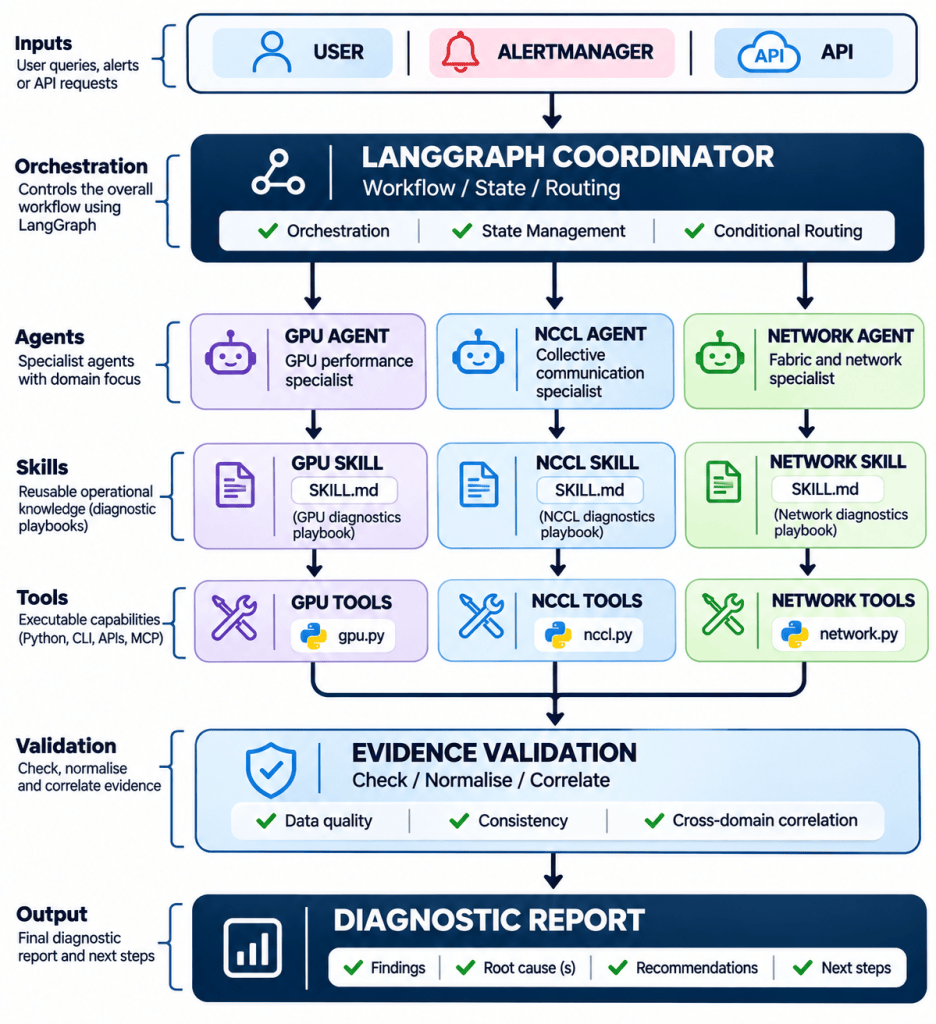
The system instructions define each agent’s responsibility.
The Skills contain the diagnostic procedure relevant to that particular agent.
The tools collect the actual evidence, whether through Python functions, APIs or MCP servers.
And LangGraph controls the overall workflow, including which stage to execute and how evidence is passed between nodes.
There is one more important aspect. Simply writing “read-only” inside a Skill does not make an agent read-only. Tool permissions, approval controls and validation must be implemented separately. The same applies to evidence quality. An LLM should not be allowed to invent missing telemetry simply because it cannot retrieve the information.
For me, that separation becomes particularly important when moving away from a lab and towards an enterprise operational platform.
Conclusion
The main reason I wanted to explore Claude Code Skills was not to compare which framework is better. It was to understand whether Skills offer something fundamentally different from the system prompts and tools I have been using with LangChain and LangGraph.
My conclusion is that Skills provide a practical way to package and reuse specialised operational knowledge. The agent can load a diagnostic procedure when it needs it, rather than carrying every procedure inside its general instructions.
LangChain provides the agent and tool abstractions. Deep Agents offers a similar Skill-loading mechanism. LangGraph gives me the ability to define and control a stateful diagnostic workflow.
They can complement each other.
If there is one point I would take away from this article, it is this:
The system prompt defines the agent’s general responsibilities. The Skill provides the specialised playbook. The tool performs the action. The workflow controls the execution.
Understanding these differences is more important to me than simply getting an agent to run a few commands.
The next useful exercise will be to implement and test both approaches against the same simulated FabricMind incident, and compare what the agents actually do rather than what we expect them to do.



Leave a Reply