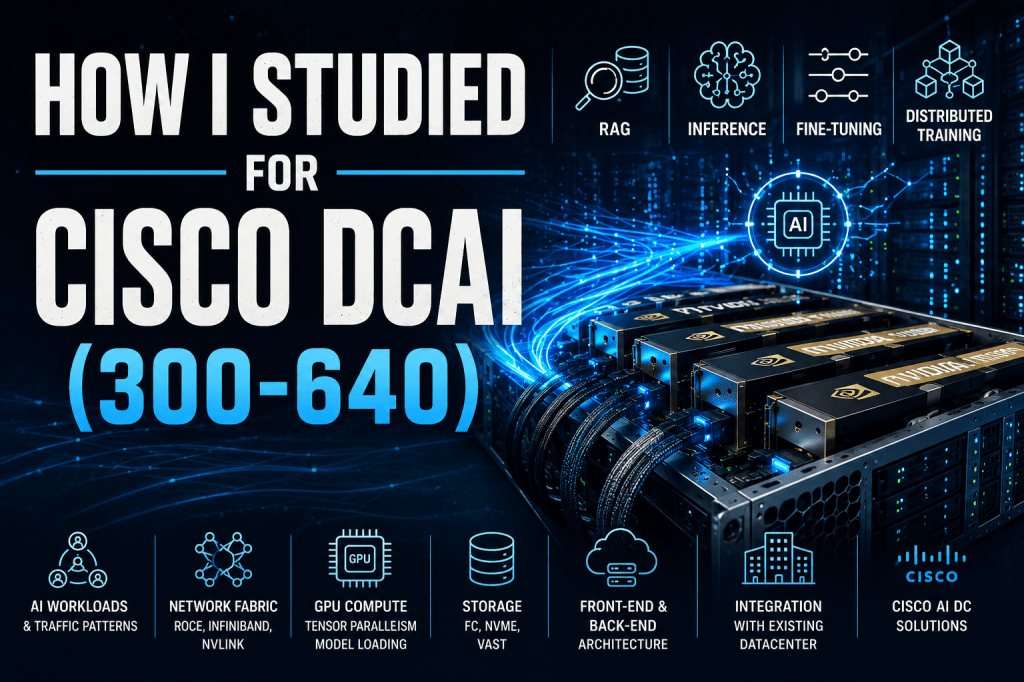
My goal for this exam was to reach the point where someone could describe an AI business requirement and I could immediately translate it into the correct AI workload, networking architecture, compute requirements and storage design.
Once you reach that stage, the exam almost becomes a by-product of your learning rather than the destination.
That mindset completely changed how I approached the DCAI blueprint. But as always the blueprint should be your guide.
Don’t Study Technologies in Isolation
One of the biggest mistakes I think people make is studying technologies individually.
For example:
“Today I’ll study RoCE.”
Tomorrow:
“I’ll study InfiniBand.”
The next day:
“I’ll learn about GPUs.”
The problem is…
None of these technologies exist by themselves.
Every technology exists because an AI workload requires it.
Everything starts with understanding what the customer is trying to achieve.
Step 1 – Become an Expert in AI Workloads
If there is one area I would spend the majority of my time on…
It’s this one.
Understand the four major AI workloads inside out.
- Retrieval-Augmented Generation (RAG)
- Inference
- Fine-tuning
- Distributed Training
Don’t just learn what they are.
Understand:
- why organisations use them
- how data flows through them
- which components communicate
- what traffic patterns they create
- where bottlenecks occur
Once you understand the workload…
Almost everything else begins to make sense.
Learn the Primary and Secondary Traffic Types
This is where the networking starts becoming interesting.
For example…
Inference is primarily a north-south workload.
Users submit prompts.
Responses come back.
Simple enough.
Until…
The model no longer fits inside one GPU.
Now tensor parallelism is introduced.
Suddenly inference also generates east-west GPU traffic as multiple GPUs collectively process a single prompt.
Exactly the same workload.
Completely different network requirements.
That is the level of understanding I would recommend aiming for.
Step 2 – Learn Why the Network Fabric Exists
People often memorise:
RoCE = Ethernet
InfiniBand = HPC
That’s not enough.
Ask yourself…
Why?
Why would someone choose InfiniBand instead of Ethernet?
Why does RoCE require Priority Flow Control?
Why do ECN and DCQCN exist?
Why is NVLink faster than PCIe?
Why would Hyper-Fabric simplify deployment?
Everything should come back to supporting the workload.
The network is never the objective.
It is simply the mechanism that enables the AI workload to perform efficiently.
Step 3 – Understand GPU Compute
This was probably the area I spent the most time studying.
Forget model names for a moment.
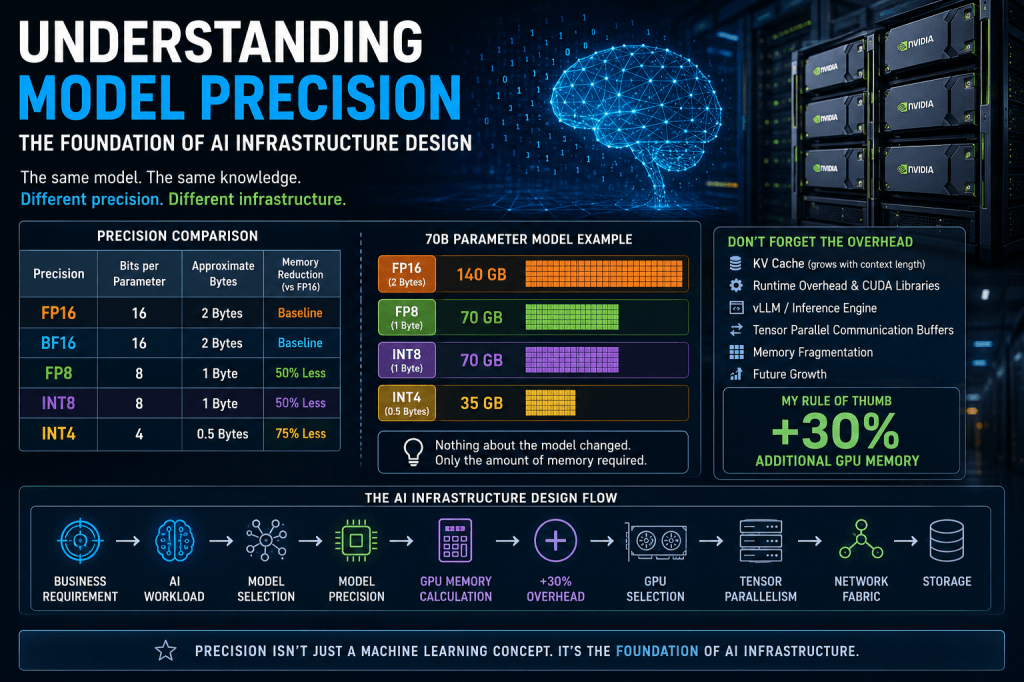
Instead, understand the relationship between:
AI workload
↓
Language model
↓
Model size
↓
Precision
↓
GPU memory
↓
Tensor parallelism
↓
GPU-to-GPU communication
↓
Network traffic
That entire chain is connected.
For example…
A customer wants to deploy a 100B parameter model.
Immediately questions should start forming in your head.
Can it fit on one GPU?
If not…
How many GPUs?
What precision?
FP16?
FP8?
INT4?
Will tensor parallelism be required?
If tensor parallelism is required…
Now I know east-west GPU traffic will exist.
Now I understand why low-latency networking matters.
Notice how every decision naturally follows from the previous one.
Nothing is random.
Step 4 – Storage Isn’t Just Storage
Storage in AI isn’t simply somewhere to save files.
Understand the role of:
- Fibre Channel
- NVMe
- NVMe over Fabrics
- VAST Data
- GPU Direct Storage
Ask yourself questions like:
Where are datasets stored?
Where are checkpoints stored?
Where does the LLM actually live before inference begins?
How is the model loaded into GPU memory?
When does storage become a bottleneck?
These concepts part of the overall design in AI infrastructures.
Step 5 – Understand the AI Data Centre Architecture
One topic I found incredibly useful was thinking of an AI data centre as having two distinct environments.
The AI front-end.
And the AI back-end.
The front-end provides the familiar enterprise services:
- Users
- APIs
- Authentication
- Existing applications
- Existing data centre integration
The back-end provides:
- GPU compute
- AI storage
- High-performance networking
- Model serving
Once you visualise these as two connected environments, many Cisco architectures become much easier to understand.
Step 6 – Learn Cisco’s AI Portfolio
Once you understand the concepts…
Then map them onto Cisco technologies.
For example:
- AI POD
- HyperFabric
- Nexus Dashboard
- Nexus Dashboard Insights
- UCS X-Series
- UCS X-Direct
- UCS Rack Servers
- Fabric Interconnects
- Nexus switching
Notice the order.
Understand the problem first.
Then learn which Cisco solution solves it.
For me majority of the technologies I studied for my CCNP Datacenter. As a result It considerably reduced my time on this particular step.
Bonus Topics Worth Learning
Although these go beyond what you strictly need for the exam based on the blueprint, I found they made everything else much easier to understand.
Spend some time learning:
- How Large Language Models are trained
- How fine-tuning differs from training
- Quantisation and precision
- How an LLM is loaded into GPU memory
- Why tensor parallelism exists
- Retrieval-Augmented Generation (RAG)
- Agentic AI frameworks
- vLLM and modern inference engines
You don’t need to become an AI researcher.
But understanding these concepts gives context to almost every infrastructure decision.
My Biggest Piece of Advice
If I could give one piece of advice to anyone studying DCAI…
Don’t study it as a networking exam.
Study it as an AI infrastructure architecture exam.
The networking…
Compute…
Storage…
GPU selection…
Cisco products…
They all exist to support one thing:
The AI workload.
Once you truly understand how an AI workload translates into infrastructure requirements, the rest of the blueprint starts falling into place.
That was probably the biggest lesson I took away from preparing for DCAI.
And, just as importantly, it’s knowledge that remains useful long after you’ve passed the exam.
I genuinely believe DCAI is one of Cisco’s most relevant certifications today. It sits at the intersection of enterprise networking, high-performance computing and artificial intelligence. If you invest the time to understand the concepts rather than simply preparing for the exam, you’ll gain skills that extend well beyond a certification—they’ll help you design the next generation of AI data centres.


Leave a comment