
I remember when started this series whilst on holiday – my family thought I was bonkers… they simply couldn’t understand my passion, which is fine I don’t expect them to understand how much I love this stuff…
As promised on part 3, this last section will focus on how to create a on-box application using external IDE (vscode) and test the application on-box in realtime externally from VSCODE.
Understanding the difference between on-box and off-box programming
When developing on-box Python applications for Cisco switches (NX-OS or IOS-XE), a key component is the native cli Python module, which provides the ability to execute switch-specific CLI commands directly from Python scripts. This module is available only on the switch itself and interacts with the switch’s operating system and its configuration. Due to this, you cannot test Python applications that rely on the cli module outside of the switch environment, as they require the underlying system context provided by the switch’s OS.
The cli module is a native library provided by the switch’s operating system (NX-OS or IOS-XE) to allow Python scripts to interface directly with the CLI commands of the switch. This is essential for automating network operations, performing configuration changes, or querying the system status.
1. The cli module(https://developer.cisco.com/docs/nx-os/cli-module/#clid) is designed to communicate directly with the switch’s internals, issuing commands like show, configure, or interface as though they were typed manually in the CLI. These commands are deeply tied to the switch’s operating system and hardware, making it impossible to replicate or test them on an external development environment like your local machine. The cli module is a bridge between on-box Python and the hardware’s control plane.
2. The cli module is not available as a downloadable or installable Python package for standard Python environments. It is a built-in feature that only exists on NX-OS or IOS-XE platforms, so attempts to import it outside the switch would simply not work.
3. The Python scripts you write for the switch depend on system commands like show version, show interfaces, or configuration commands like interface Ethernet1/1. These commands cannot run outside the context of the switch because the required system resources, configuration files, and processes do not exist externally. Unless you can run the entire IOS-XE or NX-OS externally which Uhhmmm…yeah no, just no – get that thought out of your head.
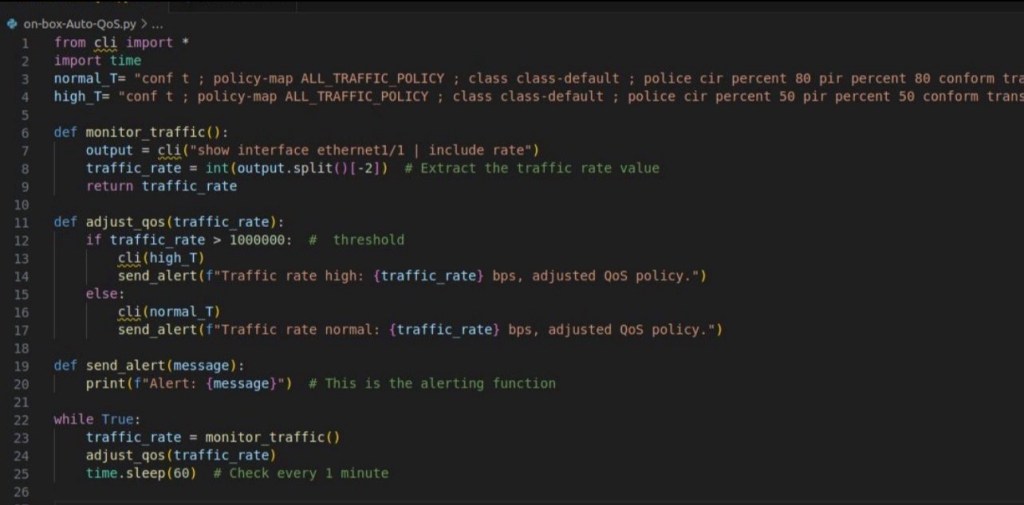
What makes the cli module unique for on-box application hosting development?
One of the major benefits of using the cli module in on-box programmability for Cisco switches (NX-OS/IOS-XE) is its capability to handle command outputs in a structured format like JSON, particularly when using clid. This makes it much easier to manipulate and use the data programmatically, compared to traditional methods where you would need to parse raw string output manually.
cli.execute(): This method executes a CLI command and returns the output as raw text. While useful for quick operations, dealing with raw text can be cumbersome, as it often requires string parsing and regular expressions to extract meaningful data from unstructured command outputs.
cli.clid(): The clid function, on the other hand, returns the output of commands in a structured JSON format. JSON is easier to handle programmatically, especially when you need to manipulate the data, extract specific fields, or perform additional logic on the results
Ease of Data Manipulation: JSON is inherently structured with key-value pairs, arrays, and nested objects. This structure makes it easier to extract specific information, perform queries on the data, and manipulate it for further automation tasks without writing complex parsers.
Faster Automation: Since you don’t need to write custom string parsers using regular expressions (REGEX) to extract specific information from CLI output, your automation scripts can be faster to develop and less error-prone.
Using clid() to Extract and Use Data in serialised JSON Format
Let’s say you’re writing a Python on-box application to check interface statuses on a Cisco switch. If you use cli.execute(), you would get a raw string output of the command show ip interface brief, which would require parsing. However, using clid() will give you a structured JSON output, which is far easier to manipulate.
Let’s create a small script to demonstrate the usability of the native on-box cli python module:
import cli
import json
# Use cli.clid() to get structured output in JSON format
output = cli.clid(‘show ip interface brief’)
# Parse the JSON output
data = json.loads(output)
# Example: Loop through the interfaces and print only those that are up
for interface in data[‘TABLE_intf’][‘ROW_intf’]:
if interface[‘proto-state’] == ‘up’:
print(f”Interface {interface[‘intf-name’]} is up with IP {interface[‘prefix’]}”)
1. Based on the above code, we can see cli.clid(‘show ip interface brief’) executes the show ip interface brief command but returns the output in serialised JSON format, rather than raw text.
2. json.loads(output) converts the serialised JSON-formatted output returned by clid() into a Python dictionary(native Python object) that you can easily manipulate
3. We then loop through the structured data to filter out interfaces that are up and print their status.
Life without the on-box cli module….
If you had to perform the same task with cli.execute() and raw string output, you would need to write custom code to parse the output, dealing with things like line breaks, spaces, and other formatting issues, making your code harder to maintain.
import cli
# Use cli.execute() to get raw string output
output = cli.execute(‘show ip interface brief’)
# Manually parse the raw string (this can get messy and error-prone)
lines = output.splitlines()
for line in lines:
if ‘up’ in line:
print(f”Line with interface up: {line}”)
While this works, it’s much harder to manage as the script grows more complex. Parsing large outputs like show bgp summary or show run becomes an absolute nightmare in terms of string manipulation, whereas with clid, you get structured data right away.
Cli module: More than Just a parser
The clid module is a powerful tool for automating tasks on Cisco switches because it returns data in JSON format, which is much easier to work with compared to raw string output. By using JSON, you can quickly extract and manipulate information programmatically without needing to rely on error-prone string parsing. This is especially important when building robust, scalable on-box applications that automate network operations inside the switch.
The cli module on Cisco devices (both NX-OS and IOS-XE) is much more than just a simple parser for CLI output. It is a native Python interface that provides extensive interaction capabilities with the underlying operating system and control plane of the switch. The module allows Python scripts to execute and manipulate the system’s CLI commands directly, acting as a bridge between Python and the nexus or catalyst 9300 hardware control plane.
Developing and Testing On-Box Python Applications: Why It Must Be Done On the Switch
Now that we understand the difference when developing on-box applications compared to off-box and because of the nature of the cli module, you must test and run your Python applications directly on the switch. Testing these scripts outside of the switch, such as on your local dev machine, will simply not work. External systems do not have the CLI interface provided by NX-OS or IOS-XE, so commands issued via cli.execute() cannot be processed.
Using VSCode and the Remote-SSH Extension to Develop and Test On-Box
Given that you can’t run cli-based scripts outside of the switch, one of the most effective ways to write and test these scripts is to use VSCode’s Remote-SSH extension. This allows you to remotely connect to the switch and develop directly on it. Here’s how you can do that:
- Install the Remote-SSH Extension in VSCode: • Open VSCode and go to the Extensions view.
• Search for “Remote – SSH” and install it. You can also install it manually https://code.visualstudio.com/docs/remote/ssh - Configure SSH Access to the Switch: • Ensure you can SSH into the switch from your development machine.
• In your ~/.ssh/config file, you can define the switch as a host for easy access.
Example:
Host nxos-switch
HostName 192.168.1.100
User admin
IdentityFile ~/.ssh/id_rsa
- Connect to the Switch via SSH in VSCode: • In VSCode, open the Command Palette (Ctrl+Shift+P or Cmd+Shift+P on macOS).
• Type Remote-SSH: Connect to Host and select your configured switch (or enter the IP address).
• This opens a remote VSCode session where you are working directly on the switch’s file system. - Once connected, create your Python scripts directly on the switch in directories like /bootflash/ or /home/admin/.
• Example script:
import cli
output = cli.execute(‘show ip interface brief’)
print(output)
Conclusion
Because the cli Python module is integral to interacting with a Cisco switch’s CLI, it is only available on the switch itself. Therefore, you cannot run or test Python applications using the cli module outside of the switch. By leveraging VSCode’s Remote-SSH extension, you can write, test, and debug your scripts directly on the switch, providing a streamlined way to develop on-box applications.
Because the cli Python module is integral to interacting with a Cisco switch’s CLI, it is only available on the switch itself. Therefore, you cannot run or test Python applications using the cli module outside of the switch. By leveraging VSCode’s Remote-SSH extension, you can write, test, and debug your scripts directly on the switch, providing a streamlined way to develop on-box applications.


 Network Automator
Leave a comment