

Use cases for open NX-OS Bash vs Guest-shell
So you’re using a nexus switch and you’re probably wondering if Guestshell is a containerised Linux distribution (CentOS) why bother with Open NX-OS bash which has direct access to the ASIC?
When it comes to network automation and on-box programmability, both Open NX-OS Bash and Guestshell offer unique advantages that cater to different aspects of on-box automation tasks. Here’s how each can be used effectively.
On-box Programmbility with Open NX-OS bash
As discussed on my previous post, Open NX-OS Bash provides direct access to the Linux environment running underneath NX-OS CLI which allows for a range of automation activities that require low-level system interaction.
1: Custom Automation Scripts Involving OS-Level Operations:
Scenario: A network engineer needs to automate tasks that involve deep interaction with the system’s underlying Linux environment, such as manipulating system files, configuring custom cron jobs, or managing system services.
Solution: A script that monitors the health of network interfaces by checking system logs and triggers alerts if specific patterns are found. This script might also adjust certain Linux kernel parameters based on the conditions observed.
So Why use Open NX-OS Bash here?
The direct access to the Linux kernel and file system enables complex, low-level automation that can’t be achieved through the traditional NX-OS CLI or within an isolated environment like Guestshell. You could possibly use Guestshell here but require NAT and other configuration such as virtual ports to allow network reachability which further complicates the process.
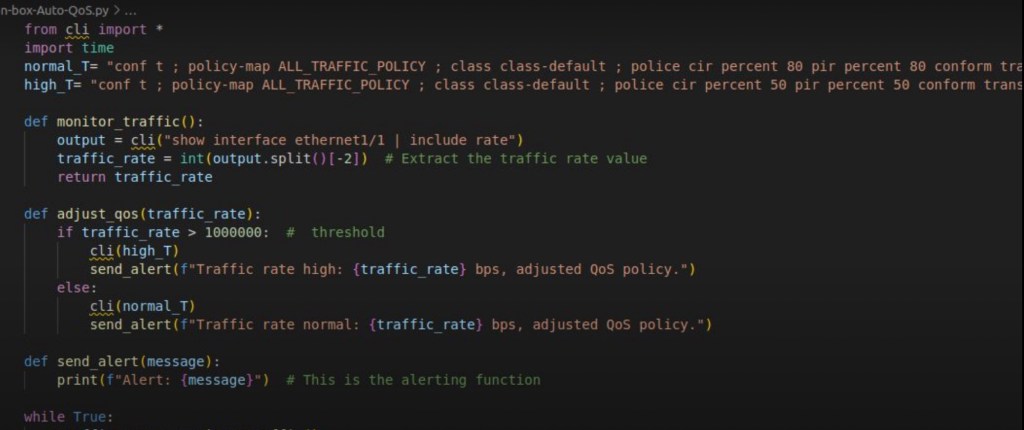
the native “CLI” module which is exclusive to on-box scripting
- Integration with External Linux-Based Tools:
Scenario: Automating network management tasks that require interaction with Linux-based tools or applications not available within NX-OS CLI or Guestshell.
Solution: A script that integrates with third-party tools like curl, wget, or custom binaries installed directly on the open NX-OS Linux environment of the switch to pull data from an external API and use that data to modify device configurations.
Why Open NX-OS Bash here?
Open NX-OS Bash provides the flexibility to install and use these tools directly, offering a more extensive range of automation capabilities. Here we’re reversing engineering by essentially viewing the switch as a Linux box as opposed to a network switch.

Python application
Onbox Programmbility with Guestshell IOx
As discussed on part 1 Guestshell is a secure, isolated CentOS Linux container that runs within the NX-OS (and IOSXE) environment, offering a safer environment for running automation scripts without impacting the core system.
- Running on-box Automation Scripts in a Secure Environment
Scenario: A network automation engineer needs to run scripts that interact with network devices but wants to ensure these scripts do not interfere with the core operating system or other underlying critical processes on the Linux subsystem of the network device.
Example: Automating the deployment of network configurations across multiple devices using a Python script that fetches configuration templates from a Git repository and applies them to the devices using the NX-API.
So use Why Guestshell here? The isolation of Guestshell ensures that even if a script malfunctions, it won’t affect the underlying NX-OS, making it ideal for routine automation tasks.
- Developing and Testing on-box Automation Scripts
Scenario: A developer is working on a new network automation tool and needs an environment where they can safely develop, test, and refine their scripts before deployment.
Example: Developing a Python-based network monitoring tool that queries device states and metrics, processes the data, and then stores it in an external database or triggers alerts.
Why use Guest-shell here?
Guest-shell offers a controlled environment for development and testing, allowing for safe experimentation without the risk of disrupting the main system. Additionally, since Guestshell supports Python and other scripting languages, it’s a natural fit for network automation development in general.
- Executing Regular Maintenance Tasks
Scenario: Automating regular maintenance tasks like log rotation, backup, or routine network health checks that need to be performed without affecting the primary operations of the switch.
Example: A script that periodically checks for outdated or large log files in the system, compresses them, and transfers them to an external storage location.
So Why use Guest-shell here?
The isolated nature of Guestshell ensures that these maintenance tasks do not interfere with critical operations, providing a safe environment to perform routine automation.
Summary
Open NX-OS Bash is ideal for automation tasks that require deep access to the system’s Linux environment, such as integrating with low-level Linux tools, performing complex system operations, or developing custom automation solutions that operate at the OS level.
Guest-shell is better suited for securely running, testing, and deploying network automation scripts in an isolated environment, particularly when the goal is to avoid potential disruptions to the core NX-OS operations. It was originally designed by Cisco for Python-based application hosting on switches/routers but can be used to develop scripts that perform regular maintenance tasks, and testing new automation on-box scripts.
Please feel free to checkout some on-box applications I recently created:
https://github.com/CobraTamer/on-box-AutoBackup



 Network Automator
Leave a comment