
Cisco Identity Services Engine (ISE) provides APIs for automation and integration with external systems. ERS (External RESTful Services) API is one of the interfaces provided by Cisco ISE for automation tasks. It allows you to perform CRUD (Create, Read, Update, Delete) operations on various ISE resources programmatically using HTTP requests.
Here’s an overview of how you can automate tasks in Cisco ISE using ERS API:
1. Authentication:
Before you can use the ERS API, you need to authenticate with Cisco ISE and obtain an access token. You can authenticate using basic authentication or OAuth 2.0. In this particular demonstration we will be using basic authentication(username & password)
2. API Endpoints:
ERS API provides endpoints for managing different resources in Cisco ISE, such as network devices, endpoints, users, and policies. Each endpoint corresponds to a specific type of resource and supports various operations.
3. CRUD Operations:
– You can use HTTP methods (GET, POST, PUT, DELETE) to perform CRUD operations on the resources.
– GET: Retrieve information about a resource or a list of resources.
– POST: Create a new resource.
– PUT: Update an existing resource.
– DELETE: Delete a resource.
4. Example Use Cases:
– Device Registration: You can automate the registration of network devices with Cisco ISE by creating device objects using the ERS API.
– Endpoint Profiling: You can retrieve endpoint information from Cisco ISE and use it for endpoint profiling and access control decisions.
– Policy Management: You can create, update, and delete policies (authentication, authorization, posture) using the ERS API.
– Guest Access Management: You can automate the creation and management of guest accounts and access policies in Cisco ISE.
5. Error Handling and Logging
Cisco ISE ERS API provides error handling mechanisms to handle exceptions and errors gracefully. You can also enable logging to track API requests and responses for troubleshooting and auditing purposes.
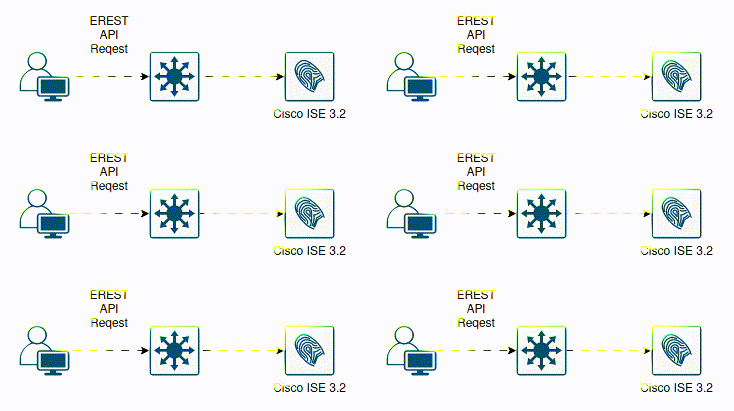
CISCO ISE ERS CRUD OPERATIONS
When working with the Cisco ISE ERS API, CRUD operations (Create, Read, Update, Delete) are commonly used to interact with various resources such as network devices, endpoints, users, and policies. Here’s an overview of each operation and the corresponding HTTP response codes you might encounter:
1. Create (POST):
– The POST method is used to create a new resource on the server.
– Example: Creating a new network device or user in Cisco ISE.
– Response Codes:
– 201 Created: The resource was successfully created.
– 400 Bad Request: The request was malformed or invalid.
– 401 Unauthorized: Authentication credentials were missing or incorrect.
– 403 Forbidden: The user does not have permission to create the resource.
– 409 Conflict: The resource already exists, and the server could not process the request.
2. Read (GET):
– The GET method is used to retrieve information about one or more existing resources from the server.
– Example: Retrieving information about network devices or endpoints from Cisco ISE.
– Response Codes:
– 200 OK: The request was successful, and the response contains the requested resource(s).
– 400 Bad Request: The request was malformed or invalid.
– 401 Unauthorized: Authentication credentials were missing or incorrect.
– 403 Forbidden: The user does not have permission to access the resource.
– 404 Not Found: The requested resource does not exist.
3. Update (PUT):
– The PUT method is used to update an existing resource on the server.
– Example: Updating the attributes of a network device or user in Cisco ISE.
– Response Codes:
– 200 OK: The resource was successfully updated.
– 204 No Content: The request was successful, but there is no content to return.
– 400 Bad Request: The request was malformed or invalid.
– 401 Unauthorized: Authentication credentials were missing or incorrect.
– 403 Forbidden: The user does not have permission to update the resource.
– 404 Not Found: The requested resource does not exist.
4. Delete (DELETE):
– The DELETE method is used to remove an existing resource from the server.
– Example: Deleting a network device or user from Cisco ISE.
– Response Codes:
– 200 OK: The resource was successfully deleted.
– 204 No Content: The request was successful, but there is no content to return.
– 401 Unauthorized: Authentication credentials were missing or incorrect.
– 403 Forbidden: The user does not have permission to delete the resource.
– 404 Not Found: The requested resource does not exist.
When interacting with the Cisco ISE ERS API, it’s important to handle these response codes appropriately to ensure the success of your API requests and handle any errors or exceptions that may occur.
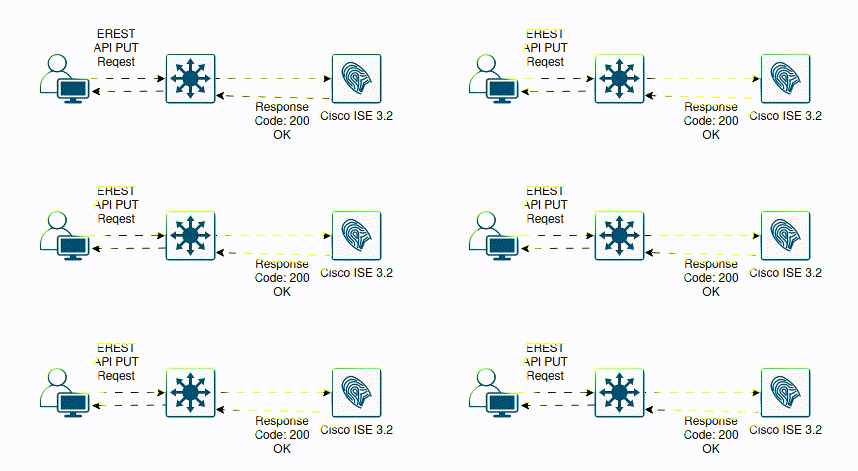
Consuming ISE API documentation
In API automation generally API documentation is crucial, especially when working with REST APIs, for several reasons:
1. Understanding API Endpoints:
– API documentation provides a comprehensive list of available endpoints, each corresponding to a specific resource or action. Understanding these endpoints is essential for interacting with the API effectively.
2. Request Parameters and Payloads:
– Documentation details the parameters and payloads accepted by each endpoint, including required and optional fields, data types, and constraints. This information guides developers in constructing valid API requests.
3. Authentication and Authorization:
– API documentation explains the authentication methods supported by the API, such as API keys, OAuth tokens, or basic authentication. It also clarifies the authorization requirements and permissions needed to access various endpoints.
4. Response Formats and Codes:
– Documentation outlines the formats of API responses, such as JSON or XML, and provides information on interpreting response data. It also specifies HTTP status codes and error messages, helping developers handle responses effectively.
5. Rate Limiting and Throttling:
– REST APIs often enforce rate limiting and throttling to prevent abuse and ensure fair usage. API documentation typically includes details on rate limits, allowing developers to design their applications accordingly.
6. Best Practices and Guidelines:
– Documentation may include best practices, guidelines, and usage examples to help developers use the API efficiently and avoid common pitfalls. This guidance ensures that developers adhere to recommended practices and design scalable, maintainable integrations.
7. Versioning and Deprecation:
– API documentation communicates versioning strategies and identifies deprecated endpoints or features. This information helps developers stay informed about changes and plan for future updates or migrations.
8. Testing and Debugging:
– Developers rely on API documentation for testing and debugging their integrations. Clear and accurate documentation enables developers to verify their implementations, troubleshoot issues, and resolve errors effectively.
USE CASE #1 HOW TO ADD AD(Active Directory) AS EXTERNAL IDENTITY SOURCE USING ERS API PROGRAMMABILITY

In this example we are going to construct a API request with the appropriate payload
In order to add Active Directory (AD) as an external identity source in Cisco Identity Services Engine (ISE) using the ERS API documentation:
1. Prepare:
– Before making any API calls, we must authenticate with the ISE ERS API using administrative credentials. In this example we will use basic authentication(username and password. In production it’s recommended that you use token based or OAuth. We must also enable ERS via ISE admin portal Go to Administration > Settings > API Settings and enable the ERS (Read/Write) toggle button.
However before we perform any of those tasks, let’s confirm ISE application server is healthy and running via CLI console:


2. Access the API Documentation:
– Navigate to the official ISE ERS API documentation provided by Cisco https://developer.cisco.com/docs/identity-services-engine/v1/.
This documentation typically includes information on endpoints, request parameters, authentication methods, response formats, and sample code.
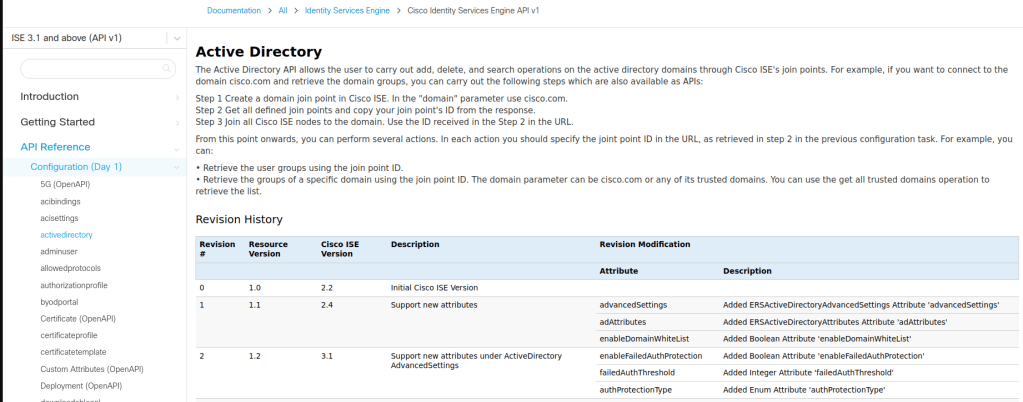
3. Identify the Endpoint:
In the API documentation, locate the endpoint for adding an external AD identity source. This endpoint is typically found under the “Active Directory” section.

4. Understand Request Parameters:
Review the request parameters required for adding an external identity source. These parameters may include the name, type, server settings, and authentication credentials for the identity source.

5. Construct the API Request:
– Using the information from the documentation, construct the API request to add the Active Directory identity source. Ensure that you provide all required parameters and follow any guidelines or constraints specified in the documentation. For example focus on the required parameters for construct your POST payload.
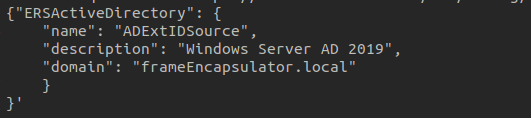
6. Test the API Request:
– Before executing the API request in your production environment, test it in a development or testing environment. Use tools such as cURL, Postman, or Python’s `requests` library to send the API request and verify the response. Personally being a Linux guy, my first API test call is always via cURL.

8. Verify the Result:
– After sending the API request, verify that the Active Directory identity source was successfully added to ISE. You can check the response code and message returned by the API, as well as verify the configuration in the ISE admin interface.
By following these steps and leveraging the API documentation provided by Cisco, you can successfully add Active Directory as an external identity source in Cisco ISE using the ERS API. This approach allows for automation, scalability, and consistency in managing network access control policies across the organization. You can automate all operational aspects of Cisco ISE via ERS RESTful API.



 Network Automator
Leave a comment